Most access controls stop at the door. Once a grant is approved, the system that approved it stops paying attention, and the next time anyone looks is the quarterly review, if at all. But the interesting moment is usually not the approval. It is the moment someone with a grant to read service logs tries to read a payment provider’s API key instead. Whether that is curiosity, a mistake, a compromised laptop or something worse, the business wants to know within minutes, not months.
This post follows one grant in the demo organisation, Northwind Labs: a one-hour read of service logs during an incident, an out-of-scope call to AWS Secrets Manager in the middle of it, and what the session-watch agent did about it. It also shows what would have happened differently if Northwind had set the agent to act on its own.
In short
- Approval is not the end of control. Session watch compares what a person does with a grant against the permission and the reason they gave.
- The example is small and real. A grant scoped to six CloudWatch Logs actions on one log group; then
secretsmanager:GetSecretValueonprod/payments/stripe-key, denied by AWS and flagged Sensitive. - Denied does not mean harmless. The call failed because the grant was narrow. The attempt is still a signal worth a person’s attention.
- The response follows your autonomy setting. At L2 the agent asks security to approve a revoke; at L3 it revokes and tells; at L4 it revokes. Every action can be seen and every L3 action undone.
Why watching a grant matters to the business
Just-in-time access shrinks the window in which a credential is useful. It does not change what happens inside that window. An hour of production access in the hands of a compromised session is an hour. Insider-risk programmes, incident responders and auditors all ask the same question afterwards: what did this person do with the access, and did it match the reason they gave?
Answering that from raw cloud logs is slow. Someone has to know which grant was active, which actions it allowed, and which entries in thousands of log lines belong to it. In practice it is done after an incident, if ever. Session watch does it continuously, for every grant, with the scope and the stated reason already attached.
data
Industry breach studies consistently find that the misuse of valid credentials is one of the most common ways attackers operate, and that breaches take months on average to identify and contain. The sooner unusual use of legitimate access is noticed, the smaller the damage.
Sources: Verizon Data Breach Investigations Report (credential abuse among top initial access vectors); IBM Cost of a Data Breach Report 2024 (time to identify and contain). Exact figures vary by year.
The grant: six log actions on one log group
Priya, an SRE on call for payments, is working incident INC-4412, “Settlement batch delayed for EU merchants”. Priya asks: “look at the payments-api logs on prod-payments for INC-4412, 1 hour”. This is AR-0001.
The entitlement the request matched has a broad read ceiling: *:Describe*,
*:Get*, *:List* and cloudwatch:GetMetricData. Read
literally, *:Get* includes secretsmanager:GetSecretValue. The
least-privilege scoper narrowed it from the request’s words to six CloudWatch Logs actions —
logs:DescribeLogGroups, logs:DescribeLogStreams,
logs:FilterLogEvents, logs:GetLogEvents,
logs:GetQueryResults and logs:StartQuery — on
arn:aws:logs:*:411122223333:log-group:/ecs/payments-api*.
The risk agent scored the narrowed request 30, Medium: production +30, critical resource +20, sensitive data +8, one hour −3, first time +5, narrow scope −10, on call −10, open incident −10. Flow #10 allows automatic approval at 30 or below, so it was approved automatically and the broker in Northwind’s network created the grant.
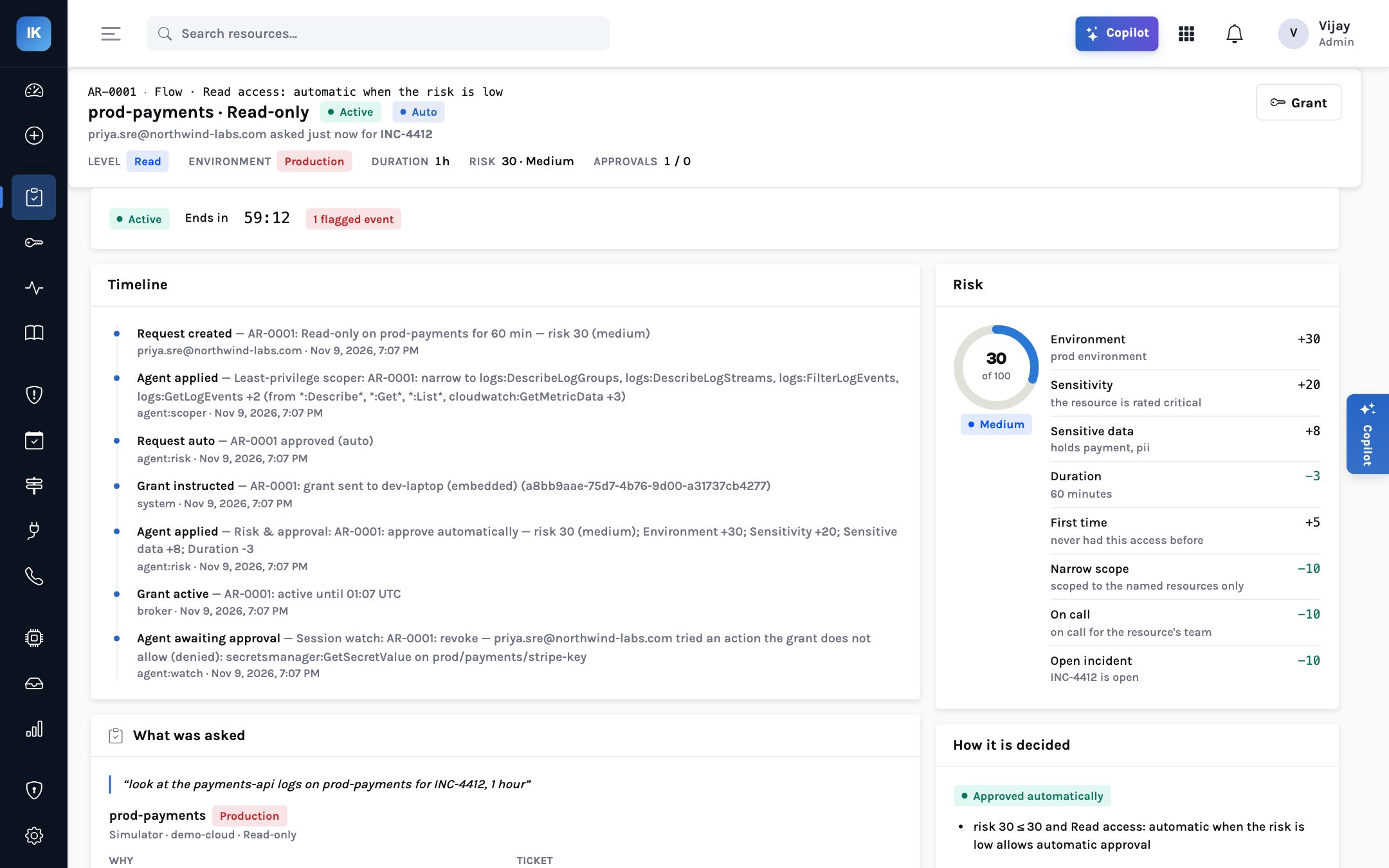
That narrowing is the first reason this story ends well. Without it, the broad ceiling would have let the secret read succeed, and session watch would be describing a leak rather than an attempt.
What happened during the hour
The broker reports activity on each grant; for AWS, that comes from CloudTrail. During AR-0001 the events were:
| Action | Resource | Result | Session watch |
|---|---|---|---|
logs:FilterLogEvents | /ecs/payments-api log group | Allowed | In scope |
logs:GetLogEvents | /ecs/payments-api log group | Allowed | In scope |
secretsmanager:GetSecretValue | prod/payments/stripe-key | Denied by AWS | Flagged: Sensitive |
The first two are exactly what the reason described. The third is not. It is outside the permission (the grant does not allow it) and outside the reason (reading logs for a settlement delay does not need the payment provider’s key). It also touches a secret on a resource that holds payment data. Session watch marks it Sensitive and puts it first on the grant page and in the sessions list.
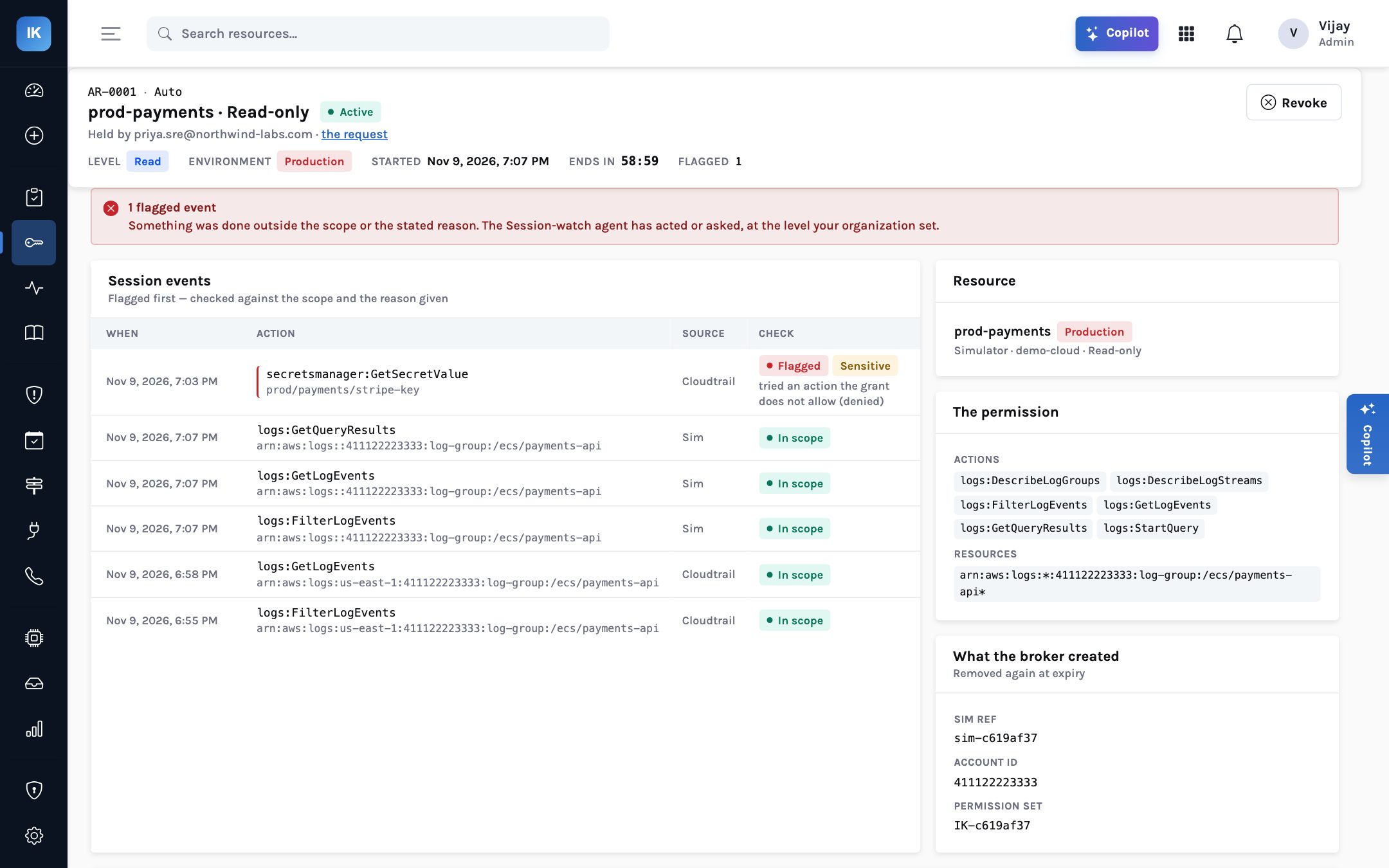
IK- permission set the broker created in IAM Identity Center.Why flag a call that failed? Because the denial tells you the control worked, not that nothing happened. Someone, or something running as Priya, tried to read a production payment secret during an incident. There may be a perfectly good explanation; an engineer chasing a suspected authentication failure with the payment provider might think to check the key. That is a conversation for security to have, today, with the facts in front of them.
How session watch decides
Session watch checks each event against two things: the permission the grant actually holds, and the reason the person gave. It looks for actions outside the permission, actions on resources outside the scope, and actions that touch sensitive material such as secrets, keys and identity changes. When something matches, it flags the event with a plain-language explanation and, depending on its autonomy level, proposes or takes an action.
The session-watch decision. Northwind runs it at the default, L2.
At L2: security is asked, in the agent inbox
Northwind runs session watch at its default level, L2 “Ask first”. So the agent did not
revoke anything on its own. It put a proposal in the agent inbox: revoke AR-0001, because
priya.sre@ tried an action the grant does not allow,
secretsmanager:GetSecretValue on prod/payments/stripe-key. The proposal
shows the justification Priya gave, the event it is based on, and Approve and Reject buttons.
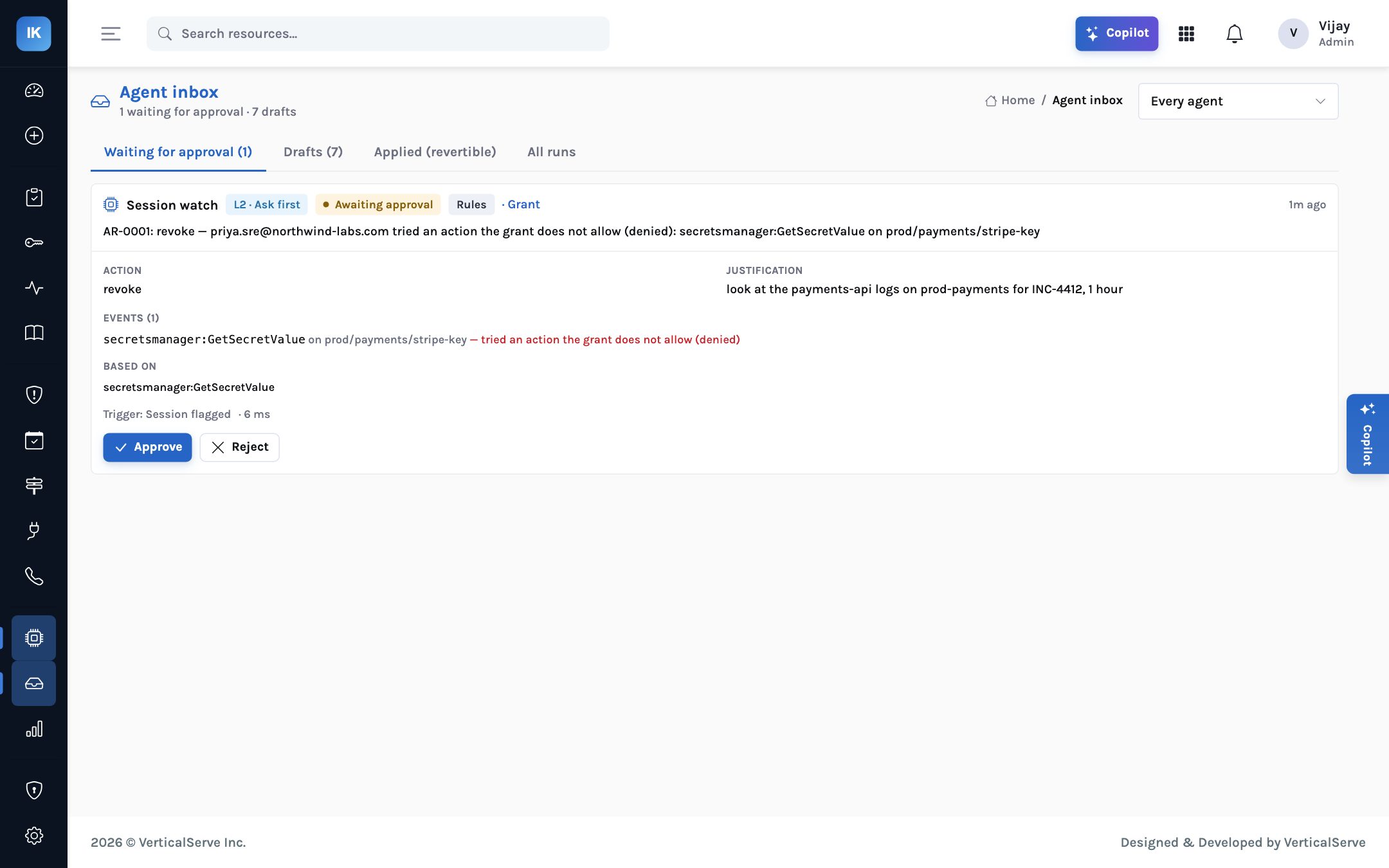
AR-0001 at L2. At L3 the approve step disappears and security is told after the revoke instead.
Security has three sensible responses. Approve the revoke, if the call makes no sense for the task. Reject the proposal, if they have spoken to Priya and the explanation holds; the flag stays on the record either way. Or approve the revoke and open an investigation, if the call looks like it did not come from Priya at all. The copilot can help with the follow-up questions: “what did Priya do with this grant?” is answered from the same records.
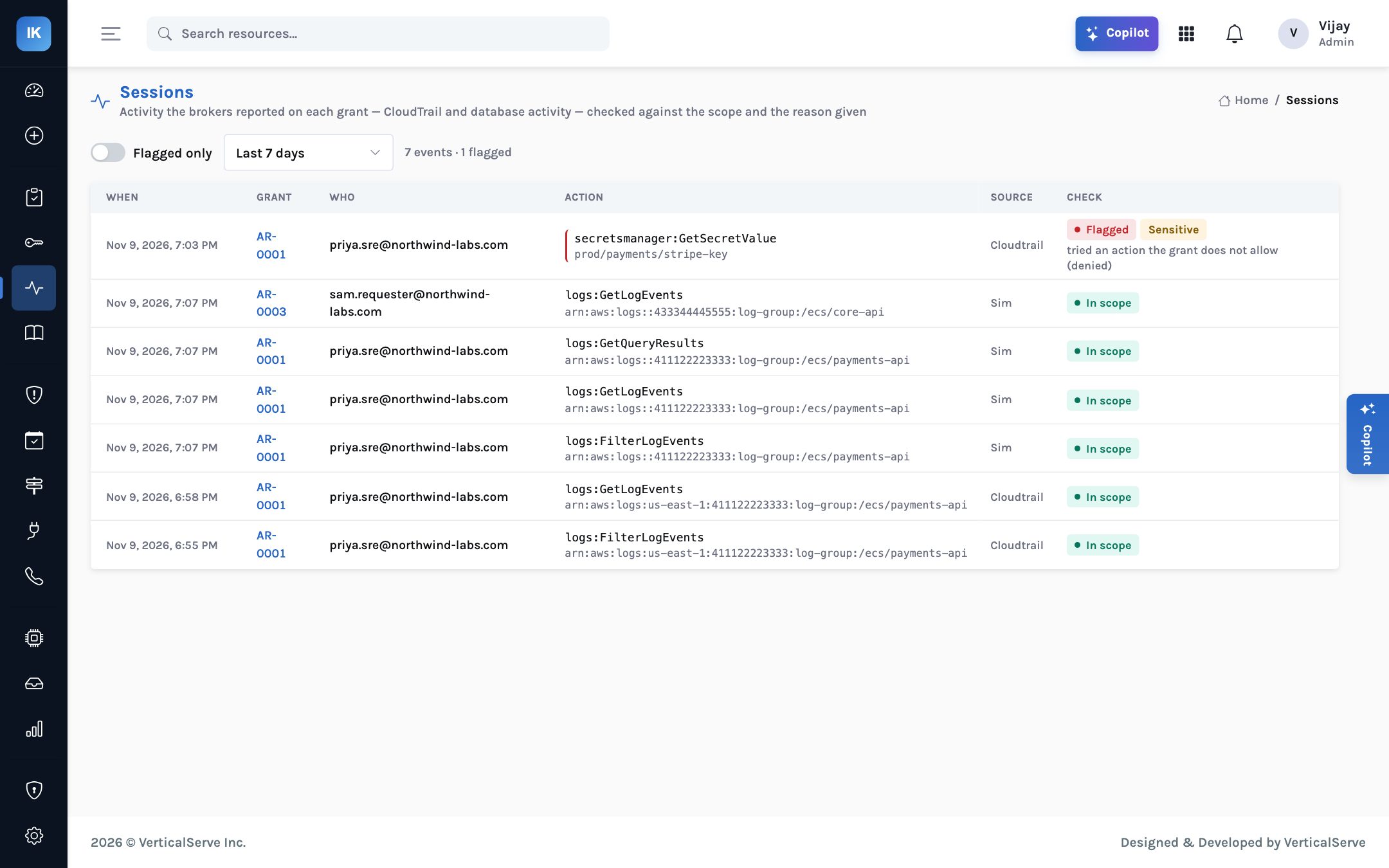
Security does not have to start from the inbox. The sessions page lists activity across every live grant, with flagged events first, so whoever is on duty can see at a glance whether the AR-0001 call is an isolated attempt or one of several. It is also where patterns show up over time: the same entitlement producing the same kind of flag every week usually means the entitlement is wrong, not the people using it.
At L3 and L4: the agent acts first
The autonomy dial is set per agent, per organisation, and capped by a ceiling set for the deployment. For session watch the levels mean:
| Level | What session watch does with the AR-0001 event | Suits |
|---|---|---|
| L1 Draft | Prepares a revoke; a person decides and acts | Early adoption, while you calibrate what gets flagged |
| L2 Ask first (default) | Asks security to approve a revoke; revokes only on approval | Most organisations: a person stays in the loop for every revoke |
| L3 Act and tell | Revokes immediately, tells security, the revoke can be undone from the inbox | Teams that prefer to interrupt first and talk second on sensitive resources |
| L4 Act | Revokes and records it | Narrow, well-understood cases where speed matters most |
The trade-off is plain. At L2 the access stays live until a person approves, which could be minutes at three in the morning. At L3 an engineer in the middle of an incident may lose access because of a false alarm, and needs to ask again. Neither is wrong. What matters is that the choice is made deliberately, written down, and visible in the agent settings page alongside how often each agent has acted.
Open the proposal or the grant page: the event, the resource, whether AWS allowed it, and the reason given.
Is the person on call? Is the incident real and open? Ask the copilot what else was done with this grant.
Approve the revoke, or reject with a note. Both are recorded.
Most flags have a simple explanation. Record it so the next reviewer sees it.
If the call did not come from the person, treat it as a credential compromise and follow your incident process.
If a pattern keeps being flagged and approved, consider the dial or the entitlement; if it keeps being rejected, the scope may be too narrow.
What session watch is and is not
Session watch works from the activity the broker can report: for AWS, CloudTrail events, which arrive with a delay of minutes rather than seconds. It is not a keystroke or screen recording, and it does not see what someone does with data after reading it. Session recording for SSH and kubectl is on the roadmap, not in 1.0. In the demo, AWS activity is simulated; the AWS drivers are tested against moto, the AWS API emulator. A flag is a prompt for a person, not a verdict.
What it adds up to
For the CISO, approval and use are joined: every grant carries the evidence of what was done with it, and out-of-scope use surfaces the same day. For the platform lead, the scoper and session watch work together; narrow grants make attempts fail and the failures make attempts visible. For the board, the claim is modest and testable: privileged access in production is time-limited, narrowed, and watched while it is live.
A grant is a promise about what someone will do. Session watch checks the promise while it is still being kept.
Narrow the permission so the wrong call fails, flag the call so someone knows it was tried, and let your autonomy setting decide who acts first.