Every organisation that moves to just-in-time access meets the same objection within a week: “some jobs really do need admin.” It is true. Rolling back a broken deploy in production, during an incident, may need permissions nobody should hold every day. The usual compromise is to leave a handful of senior engineers with AdministratorAccess “for emergencies”. Those accounts become the most valuable credentials in the company, and the ones least often reviewed.
This post walks through a high-risk request in the demo organisation, Northwind Labs: an engineer asking for admin on a production account to roll back an authentication service deploy. It shows how the request is narrowed, why it needs a second factor and two approvers, and what the broker actually creates in AWS.
In short
- Admin is requested, not held. Sam asks for admin on
prod-corefor 30 minutes, with INC-4412 as the ticket. Nobody at Northwind keeps AdministratorAccess on that account. - “Admin” becomes four actions. The scoper narrows AdministratorAccess (
*) toecs:Describe*,ecs:List*,ecs:StopTaskandecs:UpdateServiceonservice/auth*. - The person proves it is them first. Risk 57 and flow #30 both require step-up. Approvers do not see the request until Sam confirms with a second factor.
- Two people approve, and neither is Sam.
payments.lead@andsecurity@must both approve; the requester can never approve their own request. - The broker builds and removes it. A per-grant IAM Identity Center permission set with an inline policy, deleted at expiry, created by a broker inside Northwind’s network.
The business case against standing admin
An account that holds AdministratorAccess all the time is a liability whether or not its owner is trustworthy. Laptops are stolen, sessions are hijacked, tokens leak into logs. When that happens to a standing administrator, the attacker inherits the whole account. When it happens to someone whose admin rights exist for thirty minutes a quarter, the attacker most likely inherits nothing.
data
Studies of cloud permissions have repeatedly found that the large majority of granted permissions are never used, and that highly privileged identities greatly outnumber the tasks that need them. Valid credentials remain among the most common ways in.
Sources: Microsoft State of Cloud Permissions Risks report (2023); Verizon Data Breach Investigations Report. Exact percentages vary by study.
There is also an audit and accountability cost. Auditors testing privileged access ask who holds it, who approved it and whether it was removed. A standing admin group answers the first question and fails the other two. And there is an operating cost: when the only route to admin is a person who already has it, incidents queue behind whoever is awake.
Fast in an emergency, but the access exists every hour of every day, can do anything in the account, and is reviewed once a year if at all.
Exists for thirty minutes, can do the four things the task needs on the one service named, and carries a second factor and two named approvals.
Step 1: Sam asks, and the scoper narrows
Sam is a platform engineer. During incident INC-4412 the team decides to roll back a recent deploy of
the authentication service on the prod-core account, rated high and holding personal
data. Sam types: “admin on prod-core to roll back the auth deploy for INC-4412, 30
min”. This is AR-0005.
The intake agent matches prod-core and the Administrator entitlement, whose ceiling is
AdministratorAccess: *. The least-privilege scoper reads “roll back the auth
deploy” and narrows inside that ceiling to what a rollback on Amazon ECS (Elastic Container
Service) needs:
| Actions | Resources | |
|---|---|---|
| Ceiling (AdministratorAccess) | * | * |
| Narrowed for AR-0005 | ecs:Describe*, ecs:List*, ecs:StopTask, ecs:UpdateService | arn:aws:ecs:*:422233334444:service/auth* |
That is the difference between being able to do anything in the account and being able to look at and update the auth services. No IAM, no data stores, no other services. The scoper runs at L3: it applies the narrowing and records it on the timeline, where any approver can see the before and after. If the narrowed set turns out not to be enough, the answer is a new, specific request, not a wider one.
Step 2: the score and the flow
The risk agent scores the narrowed request 57, High:
| Factor | Points | Why |
|---|---|---|
| Environment | +30 | Production |
| Resource sensitivity | +12 | prod-core is rated high |
| Access level | +25 | Admin |
| Sensitive data | +8 | Holds personal data |
| Duration | −3 | 30 minutes |
| First time | +5 | Sam has not had this access before |
| Narrow scope | −10 | Named resources only |
| Open incident | −10 | INC-4412 is open |
| Total | 57 | High: above the step-up line of 55 |
Two things now decide the route. The score is above 55, so step-up is required. And the first flow
that matches is #30, “Admin in production: two people”: approvers
payments.lead@ and security@, a ticket required, step-up required, one hour
maximum. The flow would have demanded two people even if the score had been lower, because admin in
production is never approved automatically unless a flow explicitly allows it, and #30 does
not. Sam is not on call for this team this week, so there is no on-call credit.
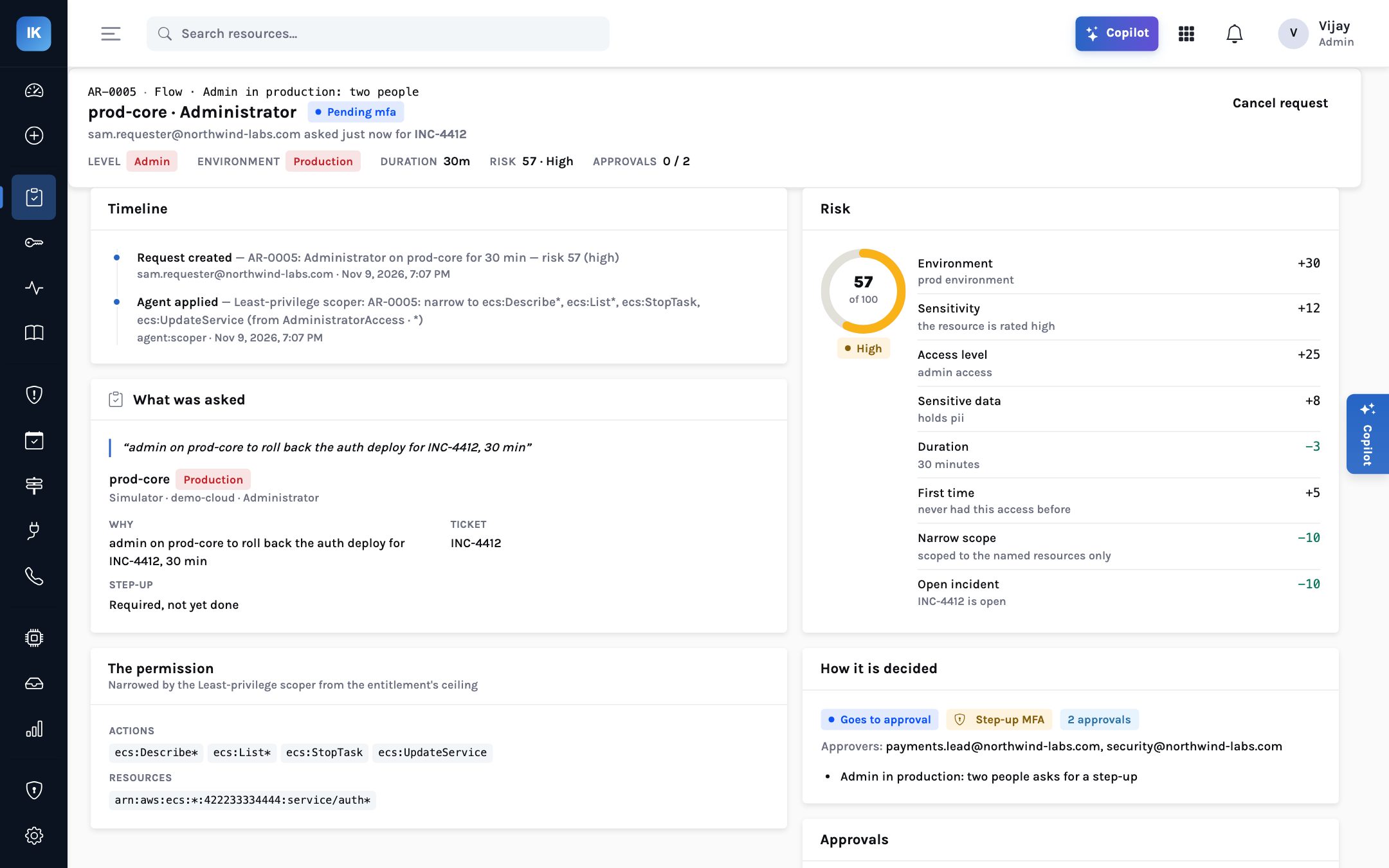
service/auth*, and “how it is decided”: goes to approval, step-up MFA, two approvals.The route AR-0005 takes. The order of the two approvals does not matter; both are required.
Step 3: the second factor comes first
Before anyone is asked to approve, Sam must prove the request is really theirs. Sam’s page says: “Waiting for your second factor — approvers see this request once you confirm it is you.” Sam confirms with the authenticator app on their phone (a time-based one-time code, with replay protection) or a Duo push. The assertion lasts five minutes and can be used once.
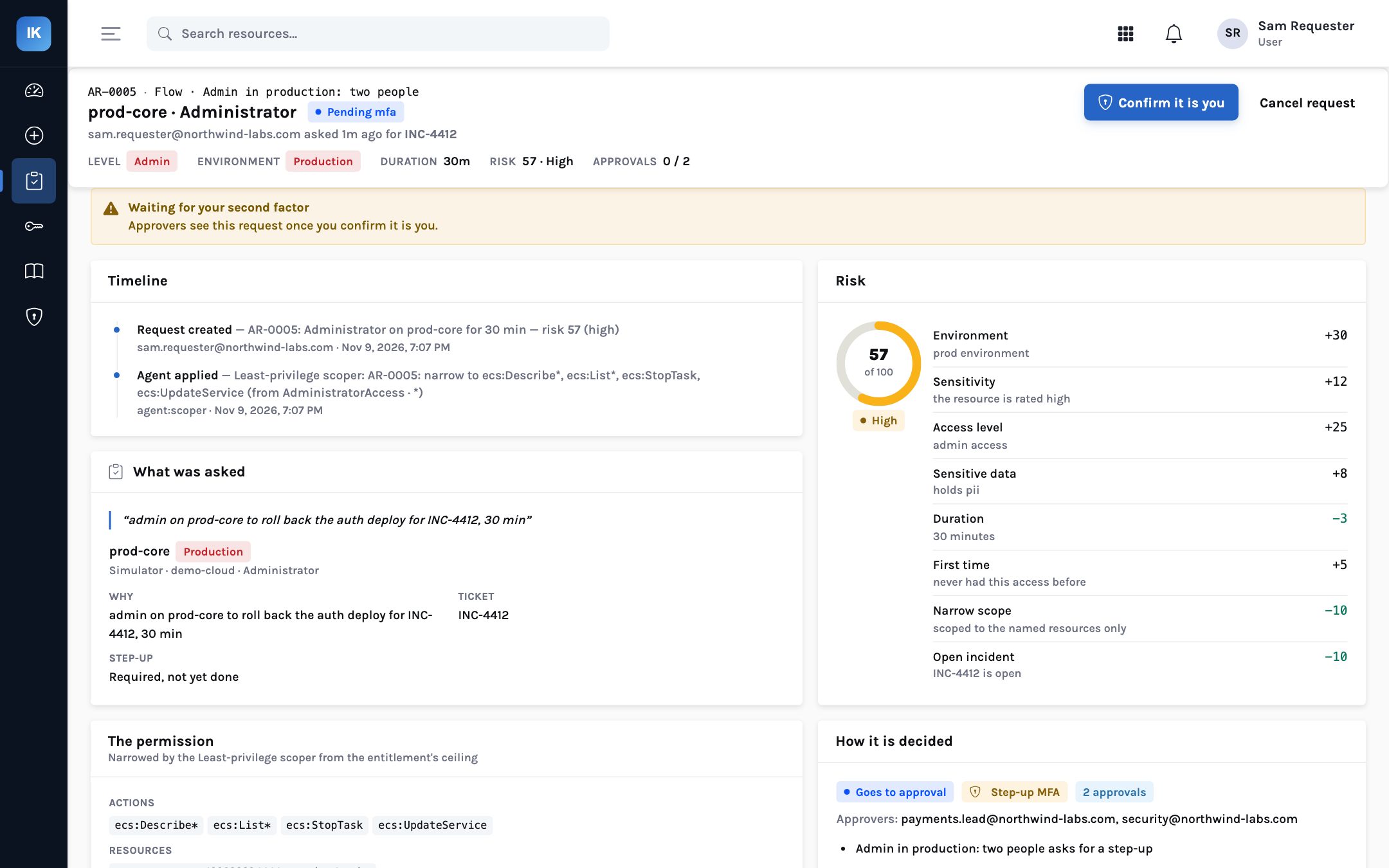
The order is deliberate. If Sam’s browser session had been hijacked, the attacker could type the sentence but could not produce the second factor, and the approvers would never be woken for a request Sam did not make. Sign-in MFA from Northwind’s identity provider protects the login; step-up protects this specific, risky action.
Step 4: two approvers, neither of them Sam
Once Sam confirms, the request reaches both approvers, in the console and as approve/deny buttons in Slack. Each sees the same page: the sentence, the ticket, the score with its factors, the narrowed permission and the thirty-minute window. The payments lead is asked whether the rollback is the right operational call. Security is asked whether the access is proportionate. The approval count goes from 0/2 to 2/2.
The requester can never be one of the two, even if Sam were listed as an approver on the flow for
some other reason. An approver can also deny with a note, which is recorded and shown to the
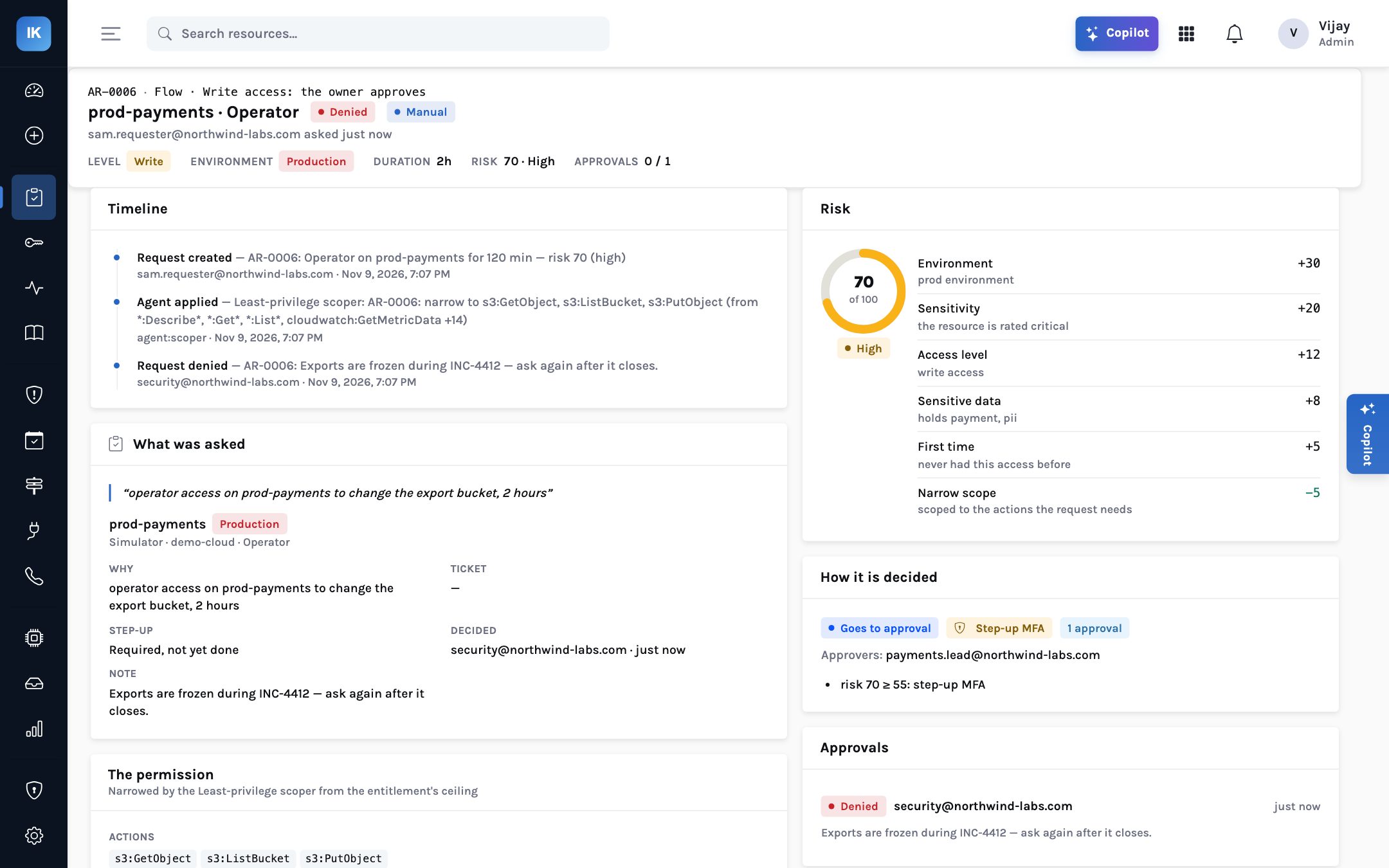
requester. In the same incident, Sam’s request AR-0006 for operator access on
prod-payments to change an export bucket was denied by security: “Exports are
frozen during INC-4412 — ask again after it closes.” A denial with a reason is part of
the record too.
Step 5: what the broker creates, and removes
With both approvals in, the control plane signs a grant instruction with Northwind’s
organisation key. The broker, running in Northwind’s network, collects it over an outbound
HTTPS connection and checks it: signature, nonce, freshness, addressee. Then it checks its own
policy file, broker.yaml, which Northwind controls. Is admin allowed to be granted at
all? Is thirty minutes within the longest grant it will create? Does the permission contain an
action it will never grant? By default those are iam:*,
organizations:* and sts:*; none appear here.
AR-0005 end to end. The granting credential, an IAM role the broker assumes, never leaves Northwind’s network.
For AWS IAM Identity Center the broker creates a permission set for this grant alone, named with an
IK- prefix, containing the four ECS actions as an inline policy and a session duration
no longer than the grant. It assigns that permission set to Sam’s Identity Center user on the
prod-core account. Sam signs in through the AWS access portal as usual and sees one
extra, short-lived option. At expiry the broker removes the assignment and deletes the permission
set, from its own local ledger, whether or not the InsightKeys service is reachable at that
moment.
Discovery and identity analysis list standing administrators and escalation paths per account.
Ceiling AdministratorAccess on each production account, owned by the platform lead.
Named approvers (an operational owner and security), ticket required, step-up, one hour maximum.
In broker.yaml, permit admin grants for those accounts and keep iam:*, sts:* and organizations:* on the never-grant list.
Run a test request end to end so the first real one is not during an incident.
Use Convert to JIT on the standing-access list; removal goes through the broker.
For the night nobody can approve: flow #5 for whoever is on call, with step-up and a review after.
Honest limits
The scoper narrows from the request’s words and from what similar past grants used. It can be wrong in either direction, which is why approvers see the narrowed permission and why a missing action means a new request, not a wider grant. The admin and ECS parts of the demo run against the simulator; the AWS drivers are tested against moto, the AWS API emulator, not large production estates. Step-up today is an authenticator app or Duo push; passkey (WebAuthn) step-up is on the roadmap. Two approvers slow things down by design: if both are asleep, break-glass is the route, not lowering the bar on this flow.
What each reader takes from it
For the CISO
Production admin is never held, only granted: narrowed, second-factored, approved by two named people and removed by software you run.
Every admin grant has the evidence an auditor will sample, written as it happened.
For the platform lead
Rollbacks are not blocked by who happens to hold admin. The request names the task and the approvers see exactly what will be allowed.
The broker’s local policy is your backstop: some actions are never granted, whatever the control plane asks.
For the board
The number of people who can change anything in production at any moment should be close to zero, and it can be shown.
High-risk access has two independent approvals and a second factor, which is what regulators and insurers increasingly expect.
Some jobs need admin. No one needs to keep it.
Ask for it with a reason, prove it is you, get two people to agree, receive the four actions the job needs for thirty minutes, and let the broker take it back.