Just-in-time access is one of the few security ideas almost everyone agrees with. Nobody should hold production administrator rights all day; they should ask, receive access for the task, and lose it afterwards. Yet many programmes that start with that goal end a year later in the same place they began: the same standing access, plus a request form that some people use some of the time. The idea was right. The design let it down.
This post looks at the four reasons JIT programmes stall most often, and the design choice that avoids each. It is written for security leaders who are starting a programme or rescuing one, and it draws on how InsightKeys is built, with the demo organisation Northwind Labs (fictional) as the worked example.
In short
- Approval fatigue. When every request needs a person’s click, approvals become a rubber stamp and a bottleneck at once. Route by an explained risk score instead.
- Roles that are still too broad. Time-limiting AdministratorAccess shortens the window but not the blast radius. Narrow each grant to the task.
- The engineer at 3 a.m. If emergency access is slow, the old standing account survives “just in case”. Make on-call and incident context part of the decision.
- Standing access never actually removed. A request path added beside the old rights changes nothing. Measure standing access and convert it, system by system.
- The test of a programme is two numbers moving apart: standing administrators falling while time to access stays short.
The pattern: a form in front of the same access
Stalled programmes look alike. A team buys or builds a request workflow. Engineers are told to use it. The first weeks go well. Then the approval queue grows, an incident happens at night and the form is bypassed, a senior engineer asks to keep their administrator rights “until things calm down”, and the old roles are never switched off because nobody is sure what would break. Twelve months later the access review still shows the same standing administrators, and the request tool has become one more system to maintain.
for low-risk work?"} B -->|"no"| C["Approval queue grows
approvers click without reading"] B -->|"yes"| D{"Is each grant narrow?"} D -->|"no"| E["Short-lived admin
same blast radius"] D -->|"yes"| F{"Does emergency access
work at 3 a.m.?"} F -->|"no"| G["Old admin kept
just in case"] F -->|"yes"| H{"Is standing access
measured and removed?"} H -->|"no"| I["Form beside the old rights"] H -->|"yes"| J["Standing admin falls
time to access stays short"] C --> K["Programme stalls"] E --> K G --> K I --> K
Four places a just-in-time programme typically stalls. Each needs a design answer, not more policy.
Reason one: approval fatigue
The most common failure is the simplest. If every request needs a manager or resource owner to approve it, two things happen together. Approvers receive so many requests that they stop reading them, so approval becomes a rubber stamp. And engineers wait, sometimes for hours, so they look for a way around the process. The control is weaker and slower at the same time.
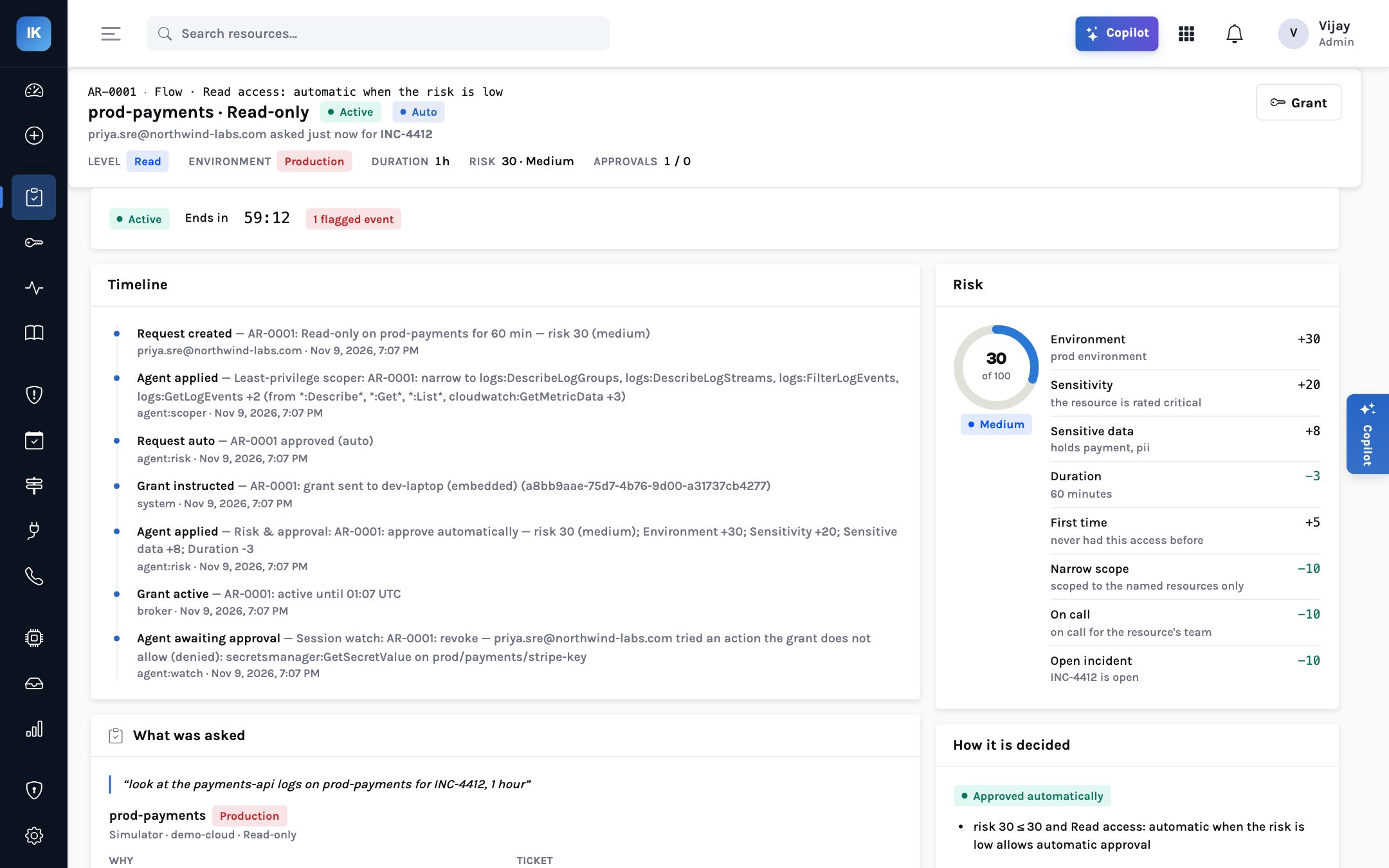
The answer is to stop treating every request as equally risky. A one-hour read of service logs in a staging account by the team that owns it is not the same as write access to a production payments database, and the route should differ. InsightKeys scores every request from 0 to 100 and shows every point: production adds 30, a critical resource 20, write access 12, a resource holding payment or personal data 8; a narrow scope, a referenced open incident or being on call for the owning team each take points off. The customer owns the weights.
| Score (defaults, editable) | Route | Demo example |
|---|---|---|
| 30 or below, where the flow allows it | Approved automatically | AR-0003: core-api logs on staging, 1 hour, risk 9 |
| Above 30, or where the flow does not allow automatic approval | The resource owner or a named approver | AR-0002: latency metrics on prod-core, risk 47, approved by security |
| 55 or above | Step-up second factor first, then approval | AR-0004: write to one invoices table, risk 62, TOTP verified, then the owner |
| 75 or above | Two people, never the requester | Flow #30 requires two people for admin in production regardless of score |
The effect on approvers is the point. When the low-risk majority is approved on the spot, the requests that do reach a person are the ones that deserve attention, and each arrives with its score explained, so the approver can see why it is there. In the demo organisation’s home page, two thirds of requests were approved automatically. That ratio is a demo figure, not a benchmark, but it illustrates the shape a healthy programme should aim for.
Reason two: roles that are still too broad
The second failure is quieter. A programme moves access from standing to on-request, but the thing
being requested is the same broad role it always was: AdministratorAccess,
PowerUserAccess, cluster-admin, a database owner login. The window shrinks from
always to eight hours, which helps, but within that window the blast radius is unchanged. A stolen
session during a JIT grant of administrator is still an administrator session.
Broad roles persist because designing narrow ones is expensive. Nobody can write a least-privilege role for every task in advance; tasks are too varied. The practical answer is to narrow at the moment of request, when the task is known.
“Admin on prod-core for 30 minutes.” The grant is AdministratorAccess: every action on every resource in the account, for half an hour.
“Admin on prod-core to roll back the auth deploy for INC-4412, 30 min.” The scoper narrows it to four ECS actions on the auth services. Two people still approve, with a second factor.
That example is AR-0005 in the demo. The least-privilege scoper works inside the entitlement’s
ceiling — it can only narrow, never widen — using the words of the request and what
similar past grants actually used. Elsewhere in the demo, a broad read-only grant became six log
actions on one log group, and a database write request on every table became INSERT, SELECT and
UPDATE on billing.invoices. A narrow scope also lowers the risk score by ten points,
which gives requesters a reason to ask for less.
Reason three: the engineer at 3 a.m.
Every JIT programme is eventually tested by an incident at night. The on-call engineer needs production access now, the approver is asleep, and the request form says “awaiting approval”. If the programme has no good answer, the engineer uses the shared administrator account that was kept “for emergencies” — and after the post-incident review, everyone agrees that account must stay. The programme has just proved that standing access is necessary.
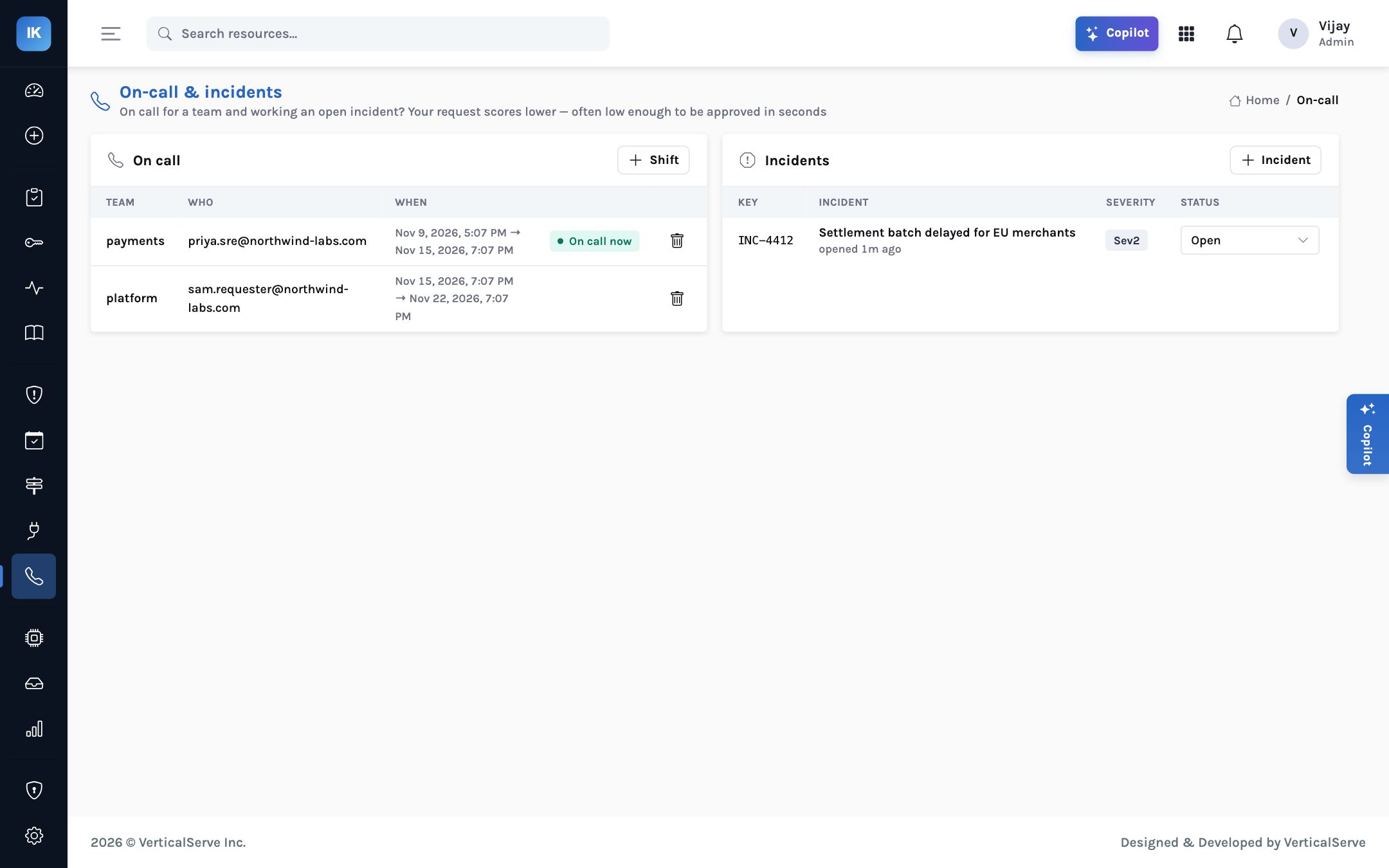
The design answer is to make emergency context part of the decision rather than an exception to it. InsightKeys holds on-call schedules and incidents. Being on call for the team that owns a resource takes ten points off the risk score; referencing an open incident takes another ten. For the cases that still need it, a break-glass flow grants instantly to whoever is on call, after a step-up second factor, tells security, caps the grant at one hour, and puts it on the list for review the next morning.
What is built and what is planned
On-call schedules and incidents are held in InsightKeys today. Synchronising them from PagerDuty or Opsgenie, and validating ticket numbers against Jira or ServiceNow, are on the roadmap. Until then, schedules need to be kept current in InsightKeys, and a ticket reference can be required by a flow but is not yet looked up in your ticketing system.
Reason four: standing access never actually removed
The last failure is the one that makes the others invisible. A request path is added, but the standing administrators, the escalation paths and the database superusers are left in place “for now”. Engineers who hold the old access have no reason to request anything. The request tool reports healthy usage from the people who never had standing rights, and the exposure is unchanged.
Removal stalls for a reason: nobody wants to be the person who removed a permission and broke production. The fear is reasonable, and the answer is evidence. If the rights have not been used in 118 days, as with one standing administrator in the demo, the risk of removing them is low and the risk of keeping them is high. If they are used every day, they probably belong to an automated job and need a different fix.
Read accounts, permission sets, assignments and IAM details; Postgres roles; Kubernetes bindings. Flag admins, escalation paths and unused access.
Draft a proposal per item with last-used date and risk, for a person to act on.
Confirm the holder can get the access on request through a flow that fits their work.
Remove the standing grant through the broker; the holder now requests when needed.
Check the person got access quickly the first time they needed it; adjust the flow if not.
The cleanup agent starts at the most cautious autonomy level, L1 Draft: it prepares the work and a person does it. That is deliberate. Removing access is the step most likely to cause friction, and it should stay a human decision until the organisation trusts the pattern.
How to tell a programme is working
The usual activity metrics — number of requests, number of users onboarded — can rise while risk stays flat. Two outcome numbers tell the real story, and they should move in opposite directions.
| Measure | Healthy direction | Warning sign |
|---|---|---|
| Standing administrators left, by system | Falling every month | Flat, while request volume rises: a form beside the old rights |
| Median time to access | Seconds for low risk, minutes for approved | Hours: engineers will route around the process |
| Share approved automatically | Most low-risk work | Near zero: approval fatigue; near all: thresholds too loose |
| Break-glass grants | Rare, each reviewed | Frequent: normal work is being forced through the emergency path |
| Average permissions per grant | Narrower than the entitlement ceiling | Equal to the ceiling: roles are still too broad |
For the CISO
Ask for the two numbers every month. If standing admin is not falling, find out which system and which owner, and treat it as a risk decision someone has to sign.
Treat break-glass usage as a signal about the normal path, not just a control to audit.
For the platform lead
Start with the team that feels the pain of slow access most, show them access in seconds, then remove their standing rights. Success there sells the next team.
Tune thresholds on real data after a month, not on guesses before launch.
For the board
A programme is not finished when the tool is installed. It is finished when the number of people who could take over production on an ordinary Tuesday is small, named and justified.
Ask whether that number fell this quarter.
Just-in-time access fails when it is slower, broader or more fragile than the standing access it replaces.
Route by explained risk, narrow every grant to the task, make emergencies part of the design, and measure the standing access you still carry until it is gone.