Kubernetes access in most organisations has two settings: none, or a lot. Engineers
are added to a group that is bound to cluster-admin “so they can debug”,
and from that day they can read every secret in every namespace on the production cluster. It is
not that anyone wanted that. Fine-grained RBAC (role-based access control) is tedious to manage by
hand, and the incident is happening now. The result is that a single stolen kubeconfig is often
enough to own the cluster.
This post follows one request in the demo organisation, Northwind Labs: an SRE who needs to look at
crash-looping settlement pods in the payments namespace of the production cluster for
45 minutes. The broker creates a RoleBinding for that one person, in that one namespace, with
read-only verbs, and deletes it when the time is up.
In short
- Cluster-admin is the usual default, and the usual exposure. Northwind’s discovery found
jordan.dev@bound to cluster-admin oneks-prod/payments, unused for 45 days, scored Critical 80. - The alternative is a RoleBinding per grant. One binding, one person, one namespace, to a ClusterRole with
get,listandwatch, removed at expiry. - Narrow and in context scores low. AR-0007 scored 14: production and high sensitivity, offset by a 45-minute window, a narrow scope, on-call status and an open incident. Approved automatically.
- The cluster credential stays in the cluster’s network. The broker’s Kubernetes service account creates and deletes bindings; our servers hold nothing that can.
- Be clear about maturity. The Kubernetes driver has been exercised against the Kubernetes API shape, not yet a large production cluster.
Why namespace-scoped access matters to the business
A production Kubernetes cluster is rarely one application. Northwind’s eks-prod
runs payments next to other services, and the payments namespace holds the
settlement workloads and their secrets. When an engineer with cluster-wide rights has a laptop
compromised, the attacker does not get the namespace they were debugging. They get all of them,
including the ability to read secrets, start privileged pods and change the cluster’s own
access rules.
The audit view is similar. Auditors increasingly treat container platforms as production systems in their own right and ask the same questions as for cloud accounts and databases: who can change production, who approved it, and when was it removed. A static group bound to cluster-admin answers none of those well.
Every member can do anything in every namespace, all the time. Membership is managed in a directory nobody reviews against the cluster.
One person, one namespace, read verbs, for 45 minutes, with a reason and an incident attached, created and deleted by the broker.
Step 1: Priya asks for one namespace
Priya is an SRE on call for payments. During INC-4412, “Settlement batch delayed for EU merchants”, the settlement pods start crash-looping. Priya types: “read-only on the payments namespace in eks-prod to check the crash-looping settlement pods for INC-4412, 45 minutes”. This is AR-0007.
The intake agent matches eks-prod/payments, a Kubernetes namespace in the catalogue
rated high, and the View entitlement. The least-privilege scoper checks the request against the
entitlement’s ceiling, which here is already get, list and
watch; there is nothing further to narrow, and the timeline says so. A read-only
request does not need create, delete or exec, and does not
get them.
Step 2: a score of 14, approved automatically
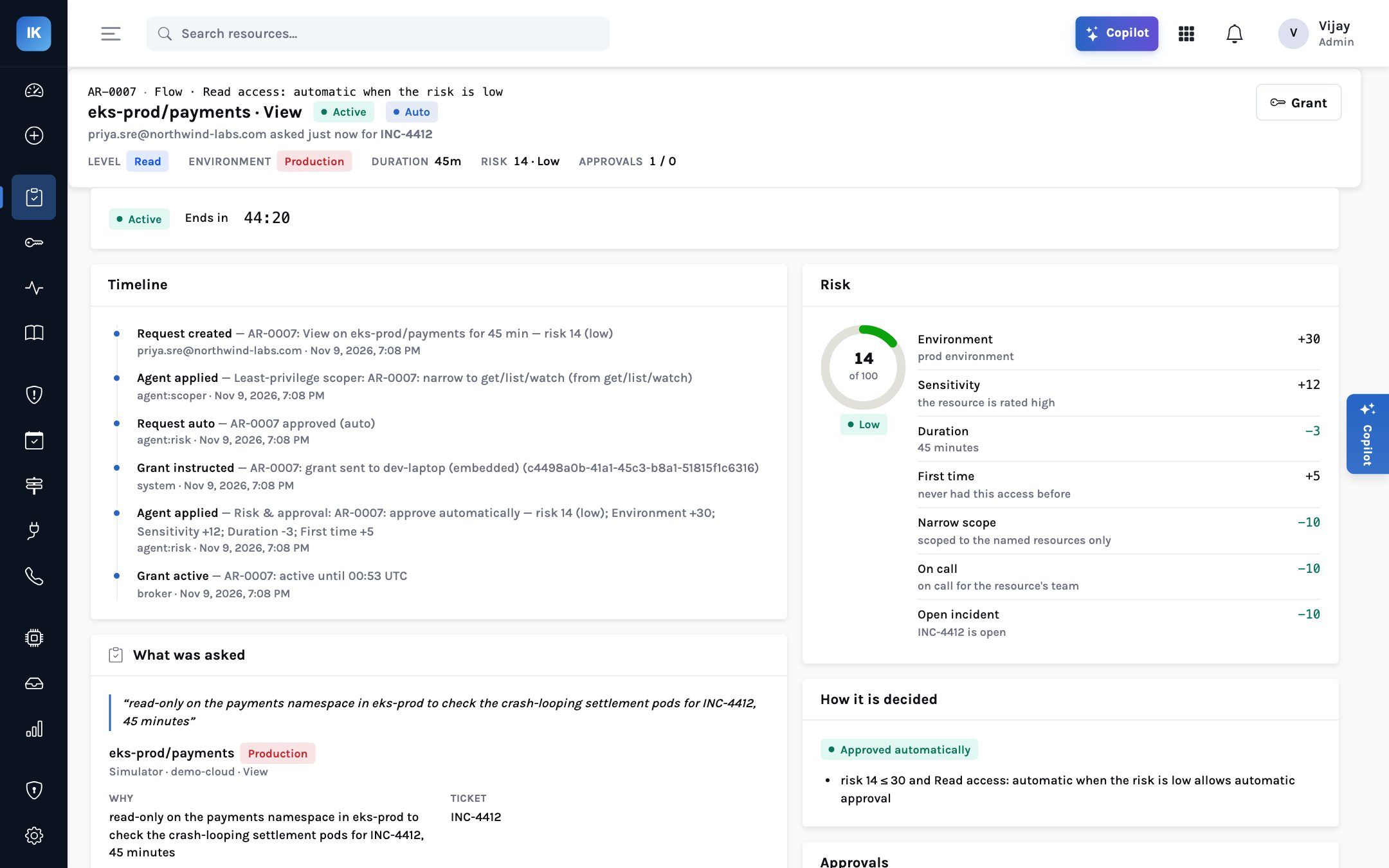
| Factor | Points | Why |
|---|---|---|
| Environment | +30 | Production |
| Resource sensitivity | +12 | The namespace is rated high |
| Duration | −3 | 45 minutes |
| First time | +5 | Priya has not had this access before |
| Narrow scope | −10 | Named resources only |
| On call | −10 | On call for the resource’s team |
| Open incident | −10 | INC-4412 is open |
| Total | 14 | Low |
Read access adds nothing, and the namespace is not marked as holding sensitive data. Flow #10, “Read access: automatic when the risk is low”, allows automatic approval at 30 or below, so the risk agent approves it. The request page explains the decision in a sentence: risk 14 is at or below 30 and the flow allows automatic approval.
Change any one of those facts and the answer moves. Ask for edit instead of
view and write access adds 12 points and routes to the owner under flow #20. Ask for
the whole cluster and the narrow-scope credit goes. Ask when you are not on call and there is no
incident, and 20 points come back. That is the point of an explained score: engineers learn what
makes a request fast, and the answer is “ask for less”.
How Kubernetes requests route at Northwind with the default thresholds.
Step 3: what the broker creates in the cluster
The broker runs inside Northwind’s network, connects out to InsightKeys over HTTPS, and accepts only instructions signed with Northwind’s organisation key. For Kubernetes it holds a service account that can manage RoleBindings. On receiving AR-0007’s grant instruction it checks signature, freshness and its local policy, then creates one object, in effect:
kind: RoleBinding
metadata: { namespace: payments, name: <one per grant> }
subjects: [ { kind: User, name: <Priya’s cluster identity> } ]
roleRef: { kind: ClusterRole, name: <a read-only role with get, list, watch> }
The detail matters for anyone who knows Kubernetes RBAC. A RoleBinding that refers to a ClusterRole
grants that role’s permissions only in the binding’s namespace. One reusable
read-only ClusterRole therefore serves every namespace, and each grant is a single, small,
namespaced binding that is easy to see with kubectl get rolebindings -n payments and
easy to delete. No ClusterRoleBinding is created, so nothing reaches outside
payments.
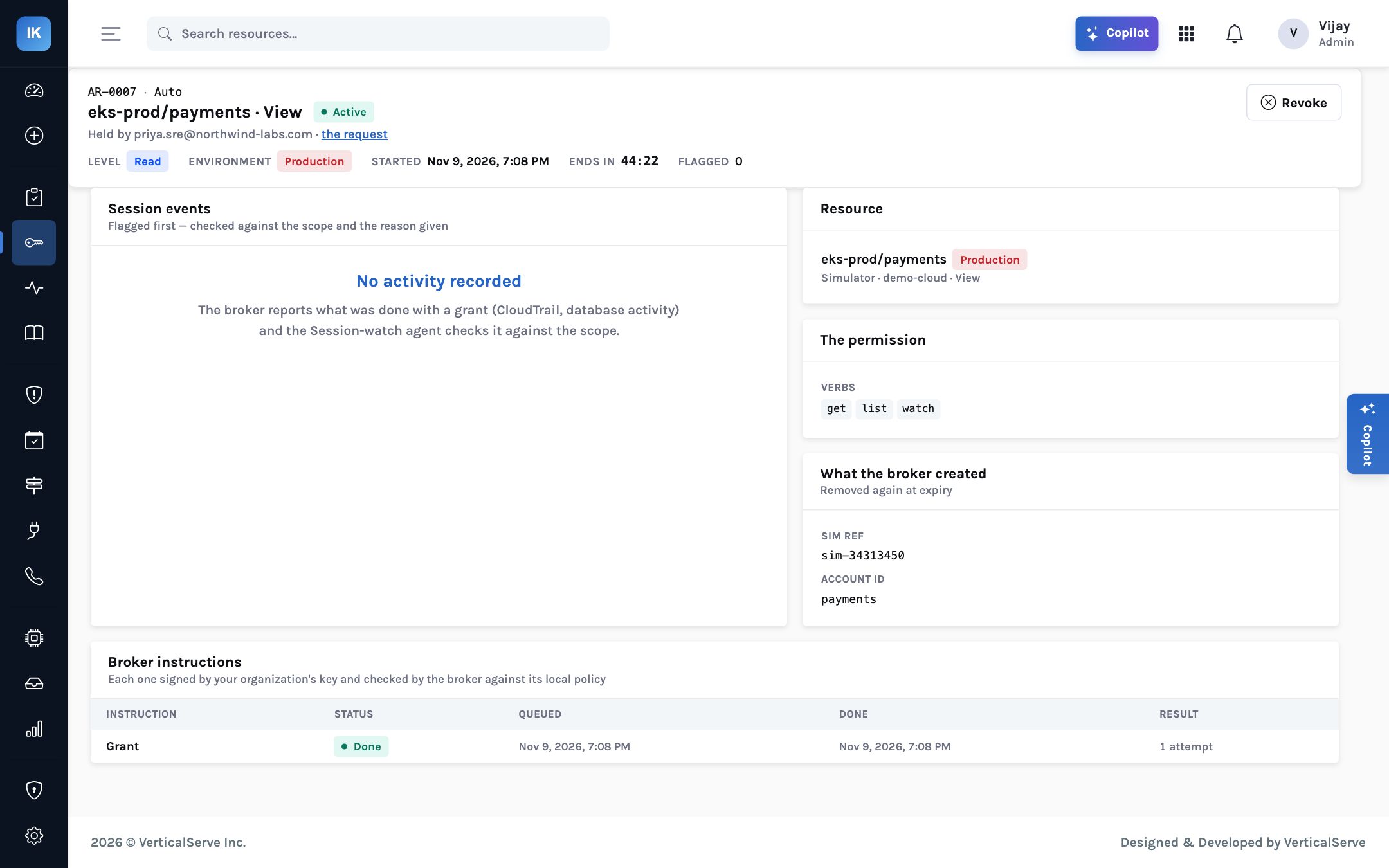
get, list, watch; what the broker created; and the signed instruction, done in one attempt. In the demo this resource runs on the simulator.AR-0007 end to end. The service account that can create bindings never leaves the cluster’s network.
Priya uses the usual kubeconfig, authenticated by however Northwind’s cluster authenticates
people. Before the grant, the API server refuses Priya; during it, Priya can list pods, read logs and
watch events in payments; after it, Priya is refused again. Priya does not receive a new
credential, so there is nothing to leak or forget to revoke.
Step 4: expiry and the standing binding next door
At 45 minutes the broker deletes the RoleBinding, from its own local ledger, whether or not the InsightKeys service is reachable at that moment. The control plane sends its own revoke too; the second delivery is harmless. Needing longer means asking again and the request is scored again with what is true then.
Meanwhile, the standing-access list still shows jordan.dev@ bound to cluster-admin on
the same cluster through a ClusterRoleBinding, last used 45 days ago. Once namespace-scoped
requests work for the team, that binding can be converted: Jordan asks for the namespace and verbs
the work needs, when it needs them, and the cluster-wide binding is removed through the broker.
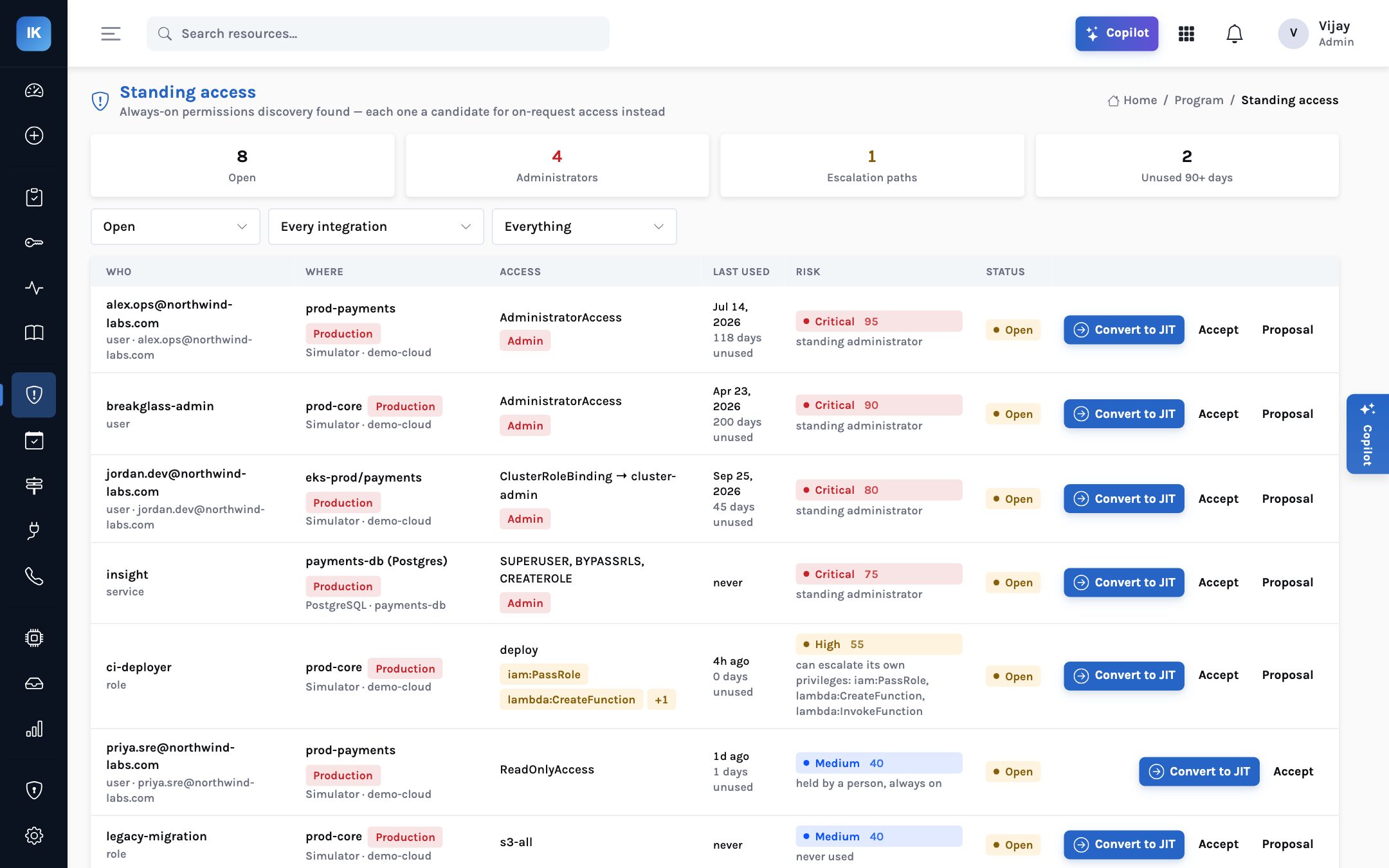
jordan.dev@ still holds cluster-admin on the same cluster, unused for 45 days and scored Critical 80. Convert to JIT is one click once namespace requests are in place.The order matters. Remove cluster-admin before engineers can get namespace access on request and the next incident will be slower, and someone will be quietly added back to the group. Make the request path work first, let the team use it for a few incidents, and then convert. The standing-access list keeps the remaining bindings visible, so the burn-down is a number rather than an intention, and each discovery run shows whether a removed binding has quietly come back.
docker run or Docker Compose today; a Helm chart is planned.
Allowed to create and delete RoleBindings in the namespaces you choose, and to bind the read-only and edit ClusterRoles you name.
Discovery lists bindings; cluster-admin bindings appear on the standing-access list.
One resource per namespace that matters, with sensitivity, an owner and View or Edit entitlements.
Reads automatic when risk is low; edit to the owner; nothing cluster-wide without two people.
Request, use, watch the binding appear and disappear.
Retire standing cluster-admin bindings, starting with the unused ones.
Honest limits
The Kubernetes driver has been exercised against the Kubernetes REST API shape, not yet against a large production cluster, and in the demo screenshots eks-prod/payments runs on the simulator. Plan a careful pilot on a non-production cluster first. Kubernetes RBAC only allows a service account to bind a role whose permissions it holds itself, or holds the bind verb for, so set the broker’s account up deliberately and review it. Session recording for kubectl is on the roadmap, not in 1.0, and InsightKeys does not decide how your cluster authenticates people; it binds roles to the identities your cluster already recognises.
What each reader takes from it
For the CISO
Cluster-wide standing admin becomes a list you can burn down, and every namespace grant has a person, a reason and an end.
A stolen kubeconfig is worth what its owner holds right now, which is usually nothing.
For the platform lead
One reusable read-only ClusterRole, one RoleBinding per grant, deleted on a clock. Easy to inspect with kubectl, easy to reason about.
Engineers learn that narrow requests during incidents are approved in seconds.
For the board
Production platforms are governed like the rest of production: least privilege, approval in proportion to risk, and evidence of removal.
The claim is modest and checkable: how many people can change the production cluster right now.
Debugging one namespace should not mean owning the cluster.
Ask for the namespace and the verbs, for the time the incident needs. The broker binds them, and unbinds them, inside your network.