The fastest way to fail with just-in-time access is to try to do everything at once: switch off every administrator, route every request through a new tool, and hope engineers cope. The programmes that work move one system and one team at a time, prove that access arrives quickly, and only then take the old standing rights away. Ninety days is enough to do that properly for a first slice of the estate, and to show the board numbers that moved.
This post is a plan for those ninety days with InsightKeys. It is written for the security leader who owns the programme and the platform lead who will run it. The phases are a guide, not a contract; smaller organisations will move faster, larger ones will repeat the middle phases team by team.
In short
- Days 1–15: install and discover. Run the broker in your network, connect single sign-on, and let discovery show you the standing access you carry.
- Days 15–40: move the first team. Build the catalogue and access flows for one production system; agents start cautious.
- Days 40–60: let low risk flow. Turn on automatic approval for low-risk reads, step-up for risky requests, and approvals in Slack.
- Days 60–80: retire standing admin. Convert the first team’s standing administrators to on-request access, with usage as evidence.
- Days 80–90: prove it. Run the first prepared access review, export evidence, and report two numbers: standing admin left and time to access.
The plan at a glance
Illustrative timing. The dates are placeholders; the sequence is what matters.
Two principles run through the whole plan. First, add the fast path before removing the old one: nobody loses standing access until they have used on-request access successfully. Second, start agents cautious and raise their autonomy on evidence: every agent can be set from L1 Draft to L4 Act, and the right setting in week two is rarely the right setting in week ten.
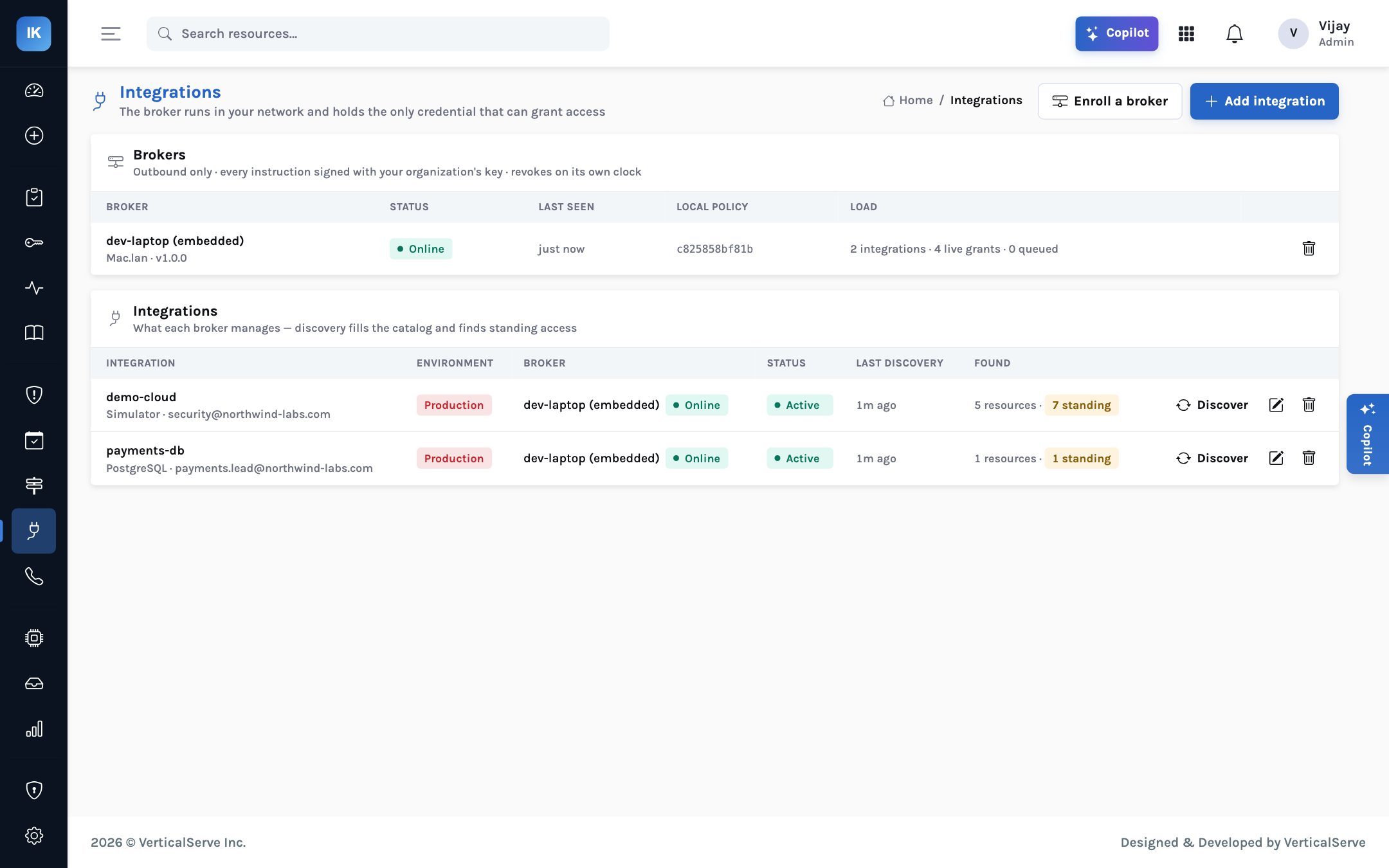
Days 1–15: install the broker and discover
The broker is the only part of InsightKeys that runs in your network, and the only part that holds a
credential able to change permissions. Today it runs with docker run or Docker Compose;
CloudFormation, Terraform and Helm packaging is planned. It connects out over HTTPS, so no inbound
firewall change is needed. Enrolment uses a single-use token, and the broker generates its own
signing key, which never leaves it.
Read the design, agree the local policy file (broker.yaml) and record any conditions.
Run the broker, give it its granting credential (an assumable IAM role, a Postgres role with CREATEROLE, a Kubernetes service account), enrol with the single-use token.
Allowed integrations, maximum grant length, forbidden actions (keep the defaults: iam:*, organizations:*, sts:*), whether admin may be granted. Test the pause switch.
OIDC from your identity provider (Okta, Entra ID, Google or Duo SSO), with its MFA.
AWS accounts, permission sets, assignments and IAM details; Postgres roles and privileges; Kubernetes bindings.
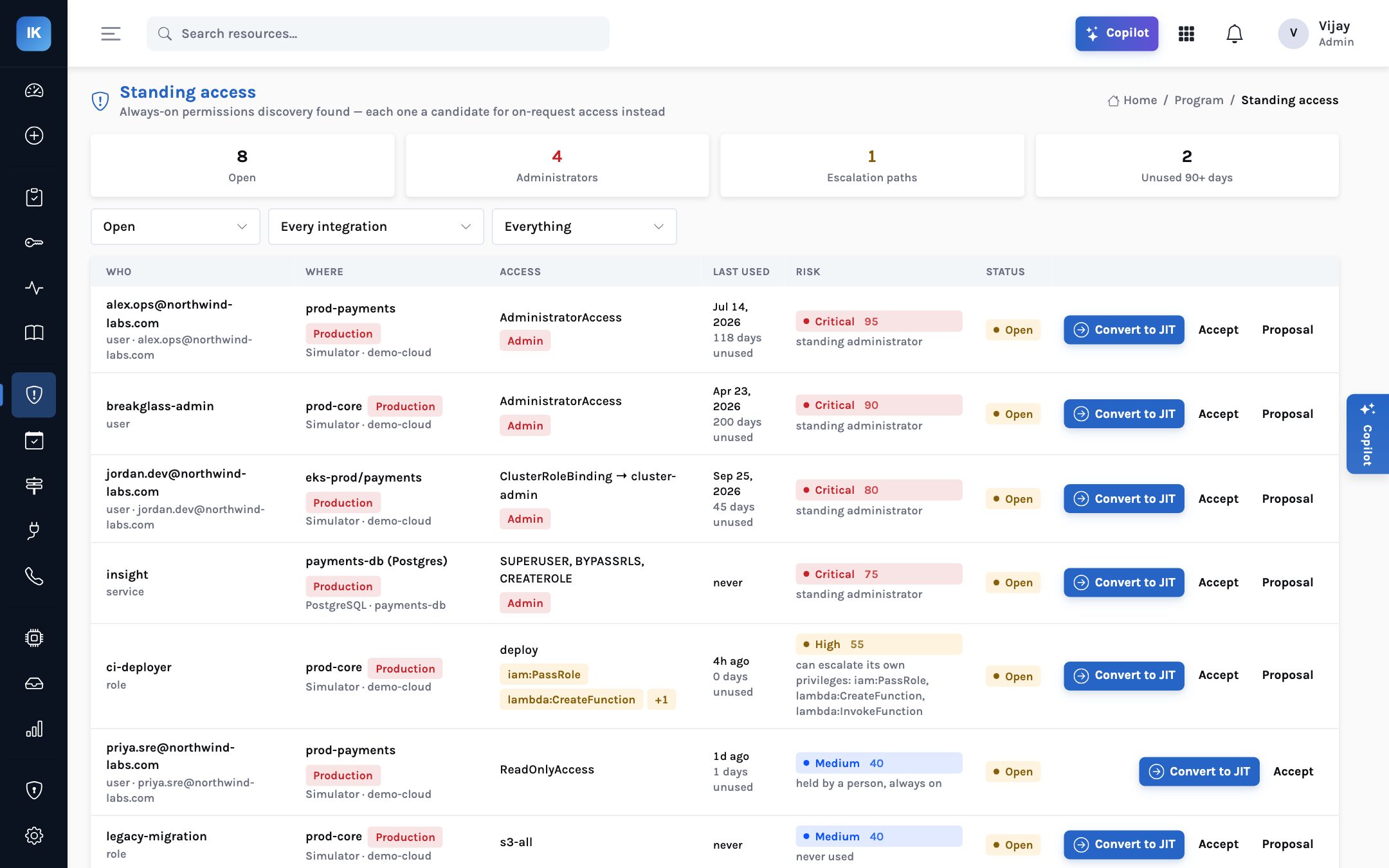
Discovery produces the first useful artefact of the programme: a list of standing access with risk, last use and a proposed action. In the demo organisation used in our screenshots, it found eight open items — four standing administrators, an escalation path through a CI deployer role, two roles unused for more than ninety days, and a database login with superuser rights that had never been used. Share your list with system owners now. It is the baseline the board report will compare against.
Days 15–40: move the first team
Choose the first team carefully. The best candidate owns an important production system, feels the pain of slow access today, and has a lead willing to be the example. A payments or core platform SRE team is often a good fit. Avoid starting with the team whose access is most politically sensitive; start where success will be visible and quick.
Build the catalogue for that team’s system: the resources, the entitlements (read, write, admin), the ceiling of each — the widest permission it may ever grant — and the owner. Then write a small number of access flows. The demo organisation’s flows are a reasonable template:
| Flow | Who and what | Route |
|---|---|---|
| #5 Break-glass | Whoever is on call, production | After step-up; security told; reviewed after; 1 hour maximum |
| #10 Read access | Reads where risk is low | Automatic; 4 hours maximum |
| #15 Non-production | Staging, dev, sandbox | Automatic; 8 hours; may auto-approve admin |
| #20 Write access | Writes to owned resources | The owner approves; 2 hours maximum |
| #30 Admin in production | Administrator rights in production | Two people (owner and security), ticket required, step-up, 1 hour |
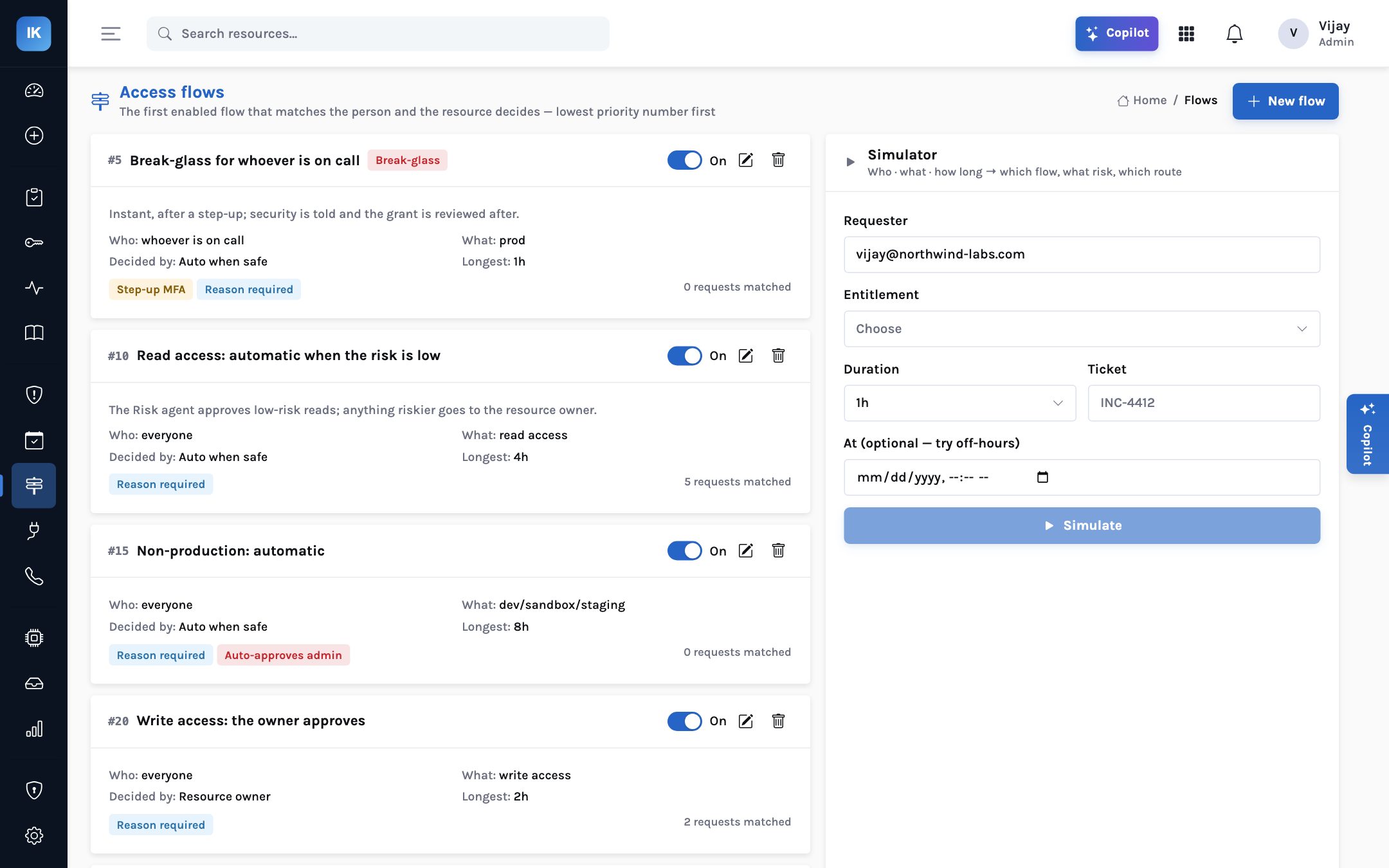
Turn requests on for the team in the console, Slack and the CLI. Keep the agents cautious at first. The least-privilege scoper and the risk agent default to L3 (act and tell, can be pulled back); the session watch defaults to L2 (asks before acting); the standing-access cleanup agent defaults to L1 (drafts only). For the first weeks, consider holding automatic approval back even where the score is low, so that the team and security can read a few dozen scored requests and agree the scores look right.
Days 40–60: let low risk flow
Once the scores look right, let low-risk requests through without a person. The default threshold is 30 or below, and only where a flow allows it; step-up second factor is asked at 55 and above; two approvers at 75 and above. These are starting points. Look at a month of real requests and adjust, in Settings, where the scores do not match the team’s judgement — the weights are yours.
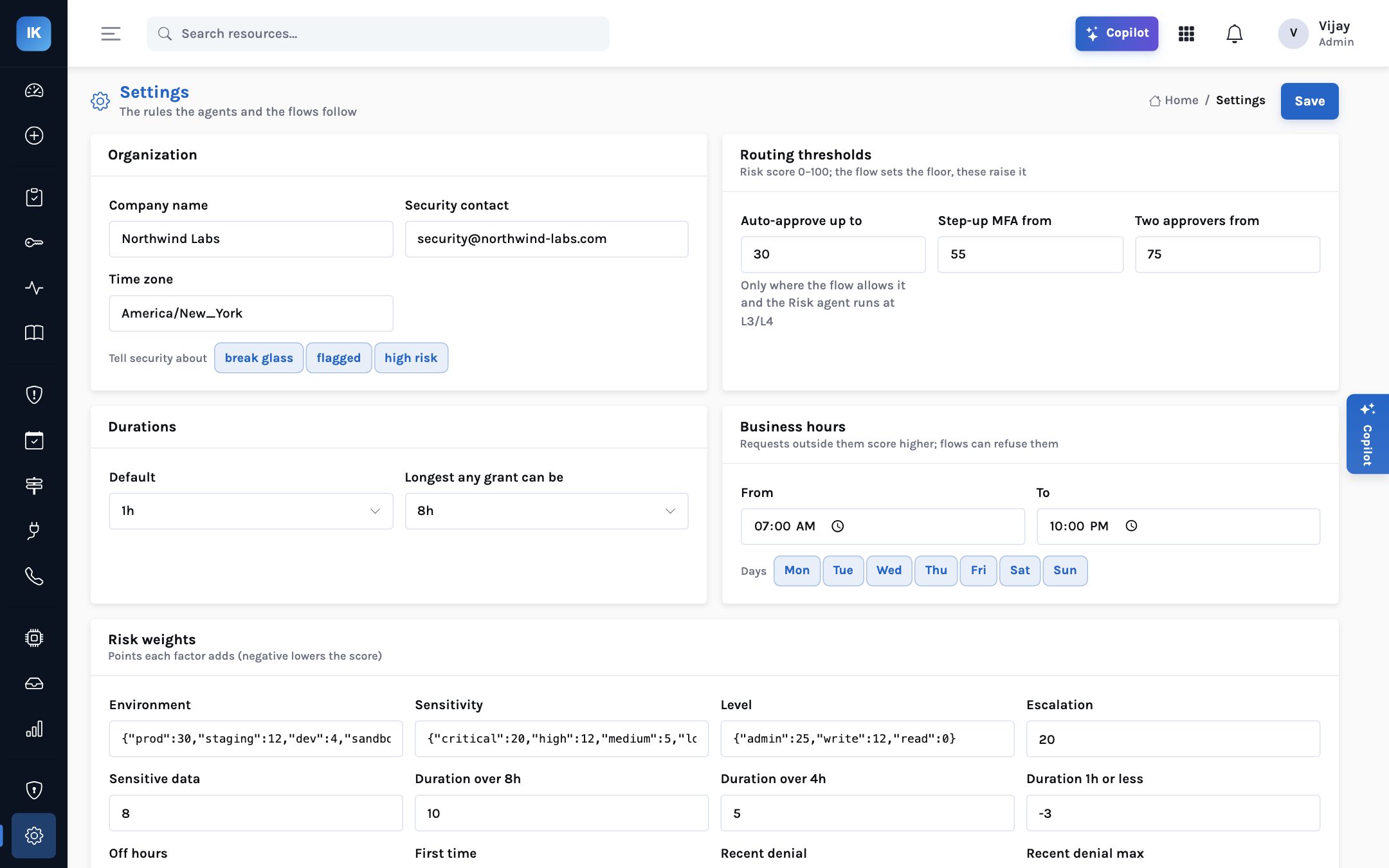
Enrol step-up at the same time. Each requester and approver registers an authenticator app or uses a Duo push, so the second factor is ready the first time a risky request needs it. Put approvers on Slack, so a request that needs the resource owner reaches them where they already are. Then watch two numbers: the share of requests approved automatically, and the median time to access. If the first is near zero, approvers will tire; if the second is measured in hours, engineers will find another way.
Days 60–80: retire standing admin
This is the step that reduces risk, and the one most programmes postpone. By now the first team has used on-request access for several weeks and knows it works. Return to the discovery list and work through that team’s standing access, one line at a time.
A list of administrators is switched off on one day. Something breaks at night, the access is restored in a hurry, and nobody tries again for a year.
Each line is taken in order of risk, with last-used date as evidence. The holder has a working request path first. Removal goes through the broker and is on the record.
The standing-access cleanup agent prepares a proposal for each line: convert this administrator to on-request access, accept this role as a justified exception, or remove this unused role. A person agrees each one with the owner. Lines with long-unused access are the easiest wins — in the demo, a standing administrator unused for 118 days and an emergency account unused for 200. Lines used daily usually turn out to be automation and need least-privilege work rather than conversion. Escalation paths, such as a CI role that can pass a privileged role to a new function, deserve their own conversation with the platform team.
Days 80–90: prove it
Close the first ninety days with the two things auditors and boards most want to see. First, a prepared access review for the first team’s production scope: standing access plus grants from the last ninety days, each line pre-filled with last use, uses in ninety days and a recommendation. The reviewer decides; removals go through the broker. Second, an evidence export of grants and reviews to InsightAssure or as CSV, so the record is in your compliance tooling rather than only in ours.
Then report upward. Keep it short: standing administrators on the first system, before and after; median time to access for low-risk and approved requests; the share approved automatically; and what the first review removed. Name the next team and the next system.
Seen
- Broker enrolled, local policy agreed
- Standing access baseline shared with owners
- First team’s catalogue and flows written
Flowing
- Low-risk reads approved automatically
- Step-up enrolled, approvals in Slack
- Time to access measured weekly
Reduced and proved
- First team’s standing admin converted
- First prepared access review complete
- Evidence exported; board report with before and after
What can slow you down
Plan around these
Coverage: InsightKeys 1.0 grants through AWS IAM Identity Center, AWS IAM, PostgreSQL and Kubernetes. If the first team’s critical access is in Google Cloud, Azure, MySQL, Snowflake or GitHub, those drivers are planned, not available; choose a different first system. Packaging: the broker runs with Docker today; if your platform standard is Helm or Terraform, that packaging is on the roadmap. On-call and tickets: schedules are kept in InsightKeys today; PagerDuty, Opsgenie, Jira and ServiceNow sync are planned. Assurance: an independent penetration test is planned before the first external customer; record it as a condition in your review.
The more common delays are organisational. Owners who will not name an approver, a senior engineer who asks to keep administrator rights “for now”, a review that slips because nobody owns it. Each of these is a decision, and each should have a named person and a date. The programme sponsor’s most useful job in the first ninety days is to make those decisions happen.
For the CISO
Sponsor the first team visibly, and make the standing-admin count a standing item in your risk report.
Treat every exception — an administrator kept “for now” — as a risk acceptance with an owner and an expiry.
For the platform lead
Do not remove anything until the replacement has worked for that person at least once.
Raise agent autonomy only on evidence: when you have read enough of their decisions to trust the next one.
For the board
Expect a short report at day 90: standing admin before and after on one system, time to access, and the next system.
Ask whether the number of people who could take over that system today is smaller than it was ninety days ago.
Ninety days will not remove all standing access. It will prove, on one system, that you can.
Install, discover, move one team, let low risk flow, convert the standing admin, and run the first review — then repeat with the next team.