An approval is a control only if the approver is actually deciding something. When every access request lands in a manager’s inbox, regardless of whether it is a read on a sandbox or administrator on production payments, approvers learn quickly that the safe and popular answer is “yes”. The control is still on paper. It has stopped working in practice.
The fix is not more approvers. It is fewer, better-placed approvals: let the obviously safe requests through on the spot, and spend human attention on the ones that deserve it, with enough context that the human can judge. This post explains how InsightKeys does that with a risk score anyone can read and a routing rule that follows from it, using real requests from the demo organisation, Northwind Labs.
In short
- Uniform approval is rubber-stamping. If a sandbox read and a production admin request look the same to the approver, neither gets real scrutiny.
- Score every request, and explain every point. A 0–100 score built from named factors (environment, sensitivity, level, duration, on call, incident, scope) that the organisation can reweight.
- Two layers decide the route. The access flow sets the rules for who may ask for what; the score moves a request between automatic approval, a person, a second factor and two people.
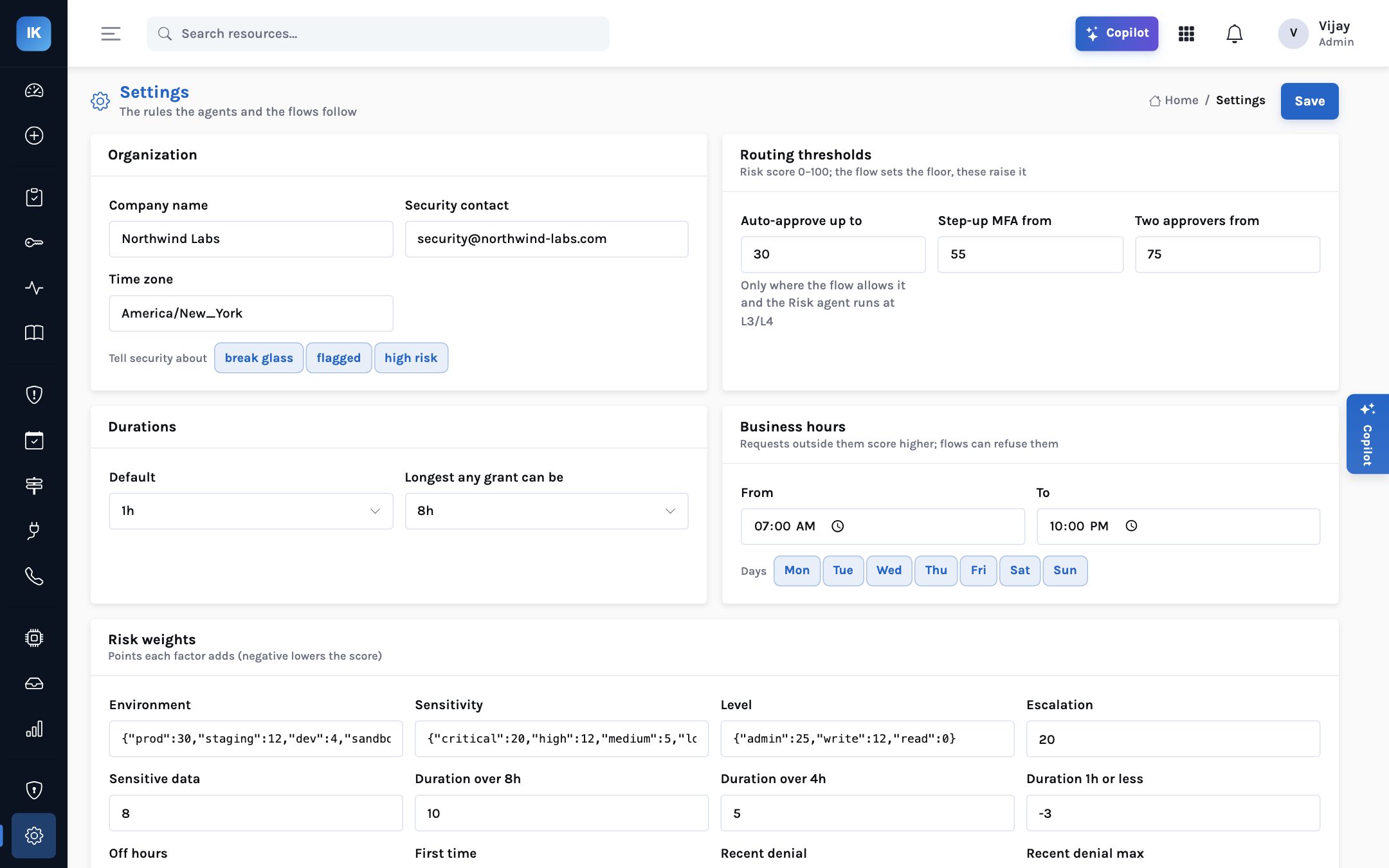
- Defaults: automatic at 30 or below, step-up at 55, two approvers at 75. Editable, and admin is never automatic unless a flow explicitly allows it.
- The approver sees the narrowed permission, the reasons and the score. That is what turns a click into a decision.
Why approvals become a rubber stamp
Approval fatigue has a simple mechanism. Approvers have other jobs. Most requests they see are routine and legitimate. The cost of saying no is a blocked colleague and an escalation; the cost of saying yes is, almost always, nothing. Within weeks the approval step is a formality performed from a phone between meetings. The rare request that deserved a hard look gets the same three seconds as the rest.
The second problem is that approvers are usually asked the wrong question. “Approve Write on payments-db for Sam?” gives them a role name and a person. They cannot see what the role actually allows, whether Sam has done this before, whether there is an incident, or whether 30 minutes or 8 hours is being asked for. They are being asked to trust, not to judge.
The third is that a uniform approval step slows down exactly the work an access programme most wants to encourage. If reading the logs of your own service at 3 a.m. during an incident requires waking a manager, engineers will lobby for standing access, and they will often win.
Same inbox, same button, same three seconds for a sandbox read and a production admin request. Engineers wait; approvers stop reading.
Low-risk requests the flow allows are approved on the spot. Riskier ones go to the owner, ask for a second factor, or need two people, with the score and its reasons on screen.
A score anyone can read
A risk score is only useful for routing if the people affected by it can see why it came out the way it did. Black-box scores invite argument and erode trust in both directions: engineers think they are being blocked arbitrarily, and security cannot defend the automatic approvals. The InsightKeys score is a sum of named factors, every point shown on the request. The weights below are the defaults; each organisation owns its own in Settings.
| Factor | Default points | Why it is there |
|---|---|---|
| Environment | prod +30, staging +12, dev +4, sandbox 0 | Production is where the data and the customers are |
| Resource sensitivity | critical +20, high +12, medium +5, low 0 | Set per resource in the catalogue |
| Access level | admin +25, write +12, read 0 | Changing things is riskier than looking at them |
| Privilege-escalation actions in the permission | +20 | e.g. iam:PassRole, iam:CreatePolicyVersion: one call from becoming admin |
| Resource holds sensitive data | +8 | Payment data, personal data |
| Duration | over 8h +10, over 4h +5, 1h or less −3 | Exposure is breadth multiplied by time |
| Outside business hours | +6 | Fewer people watching |
| First time this person has had this access | +5 | No history to compare against |
| Recent denial of a similar request | +5 each, up to +10 | Asking again after a no deserves a look |
| Requester is on call for the resource’s team | −10 | Expected to need it |
| An open incident is referenced | −10 | A business reason that can be checked |
| Narrow scope | named resources −10; named actions only −5 | Rewards asking for less |
Two design choices are worth pointing out to a governance committee. First, the score rewards good behaviour, not only penalises bad. A request that names one table, references an open incident and comes from the person on call is cheaper to approve, and should be. Second, the factors are things a manager would ask about anyway. The score does not replace judgement; it writes down the questions a careful approver would ask, answers them from the records, and adds up the answers.
Flows set the rules; the score sets the route
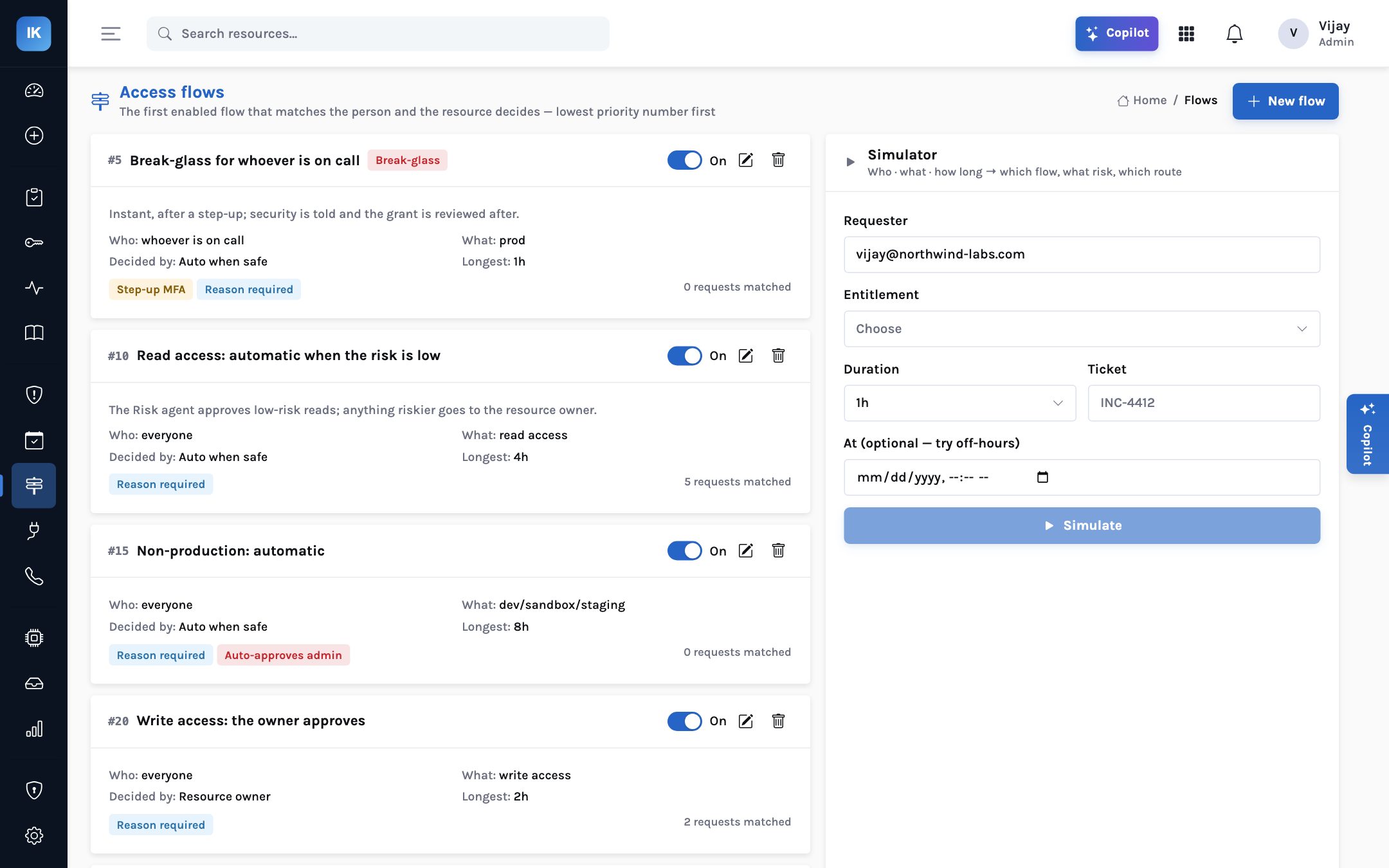
The score is one of two layers. The other is the access flow: a written rule for who may ask for what, how it is approved, the longest grant, whether a ticket or reason is required, business hours, step-up and break-glass. The first enabled flow that matches the person and the resource decides, lowest priority number first. The demo organisation has five:
| Flow | Applies to | Decided by | Longest |
|---|---|---|---|
| #5 Break-glass for whoever is on call | Production, the person on call | Automatic after step-up; security told; reviewed after | 1h |
| #10 Read access: automatic when the risk is low | Read access, everyone | Risk agent approves low-risk reads; anything riskier goes to a person | 4h |
| #15 Non-production: automatic | dev, sandbox, staging | Automatic; may auto-approve admin | 8h |
| #20 Write access: the owner approves | Write access, everyone | Resource owner | 2h |
| #30 Admin in production: two people | Admin on production | payments.lead and security; ticket required; step-up | 1h |
The thresholds then apply on top. Automatic approval happens only when the flow allows it and the score is 30 or below. A score of 55 or more asks the requester for a step-up second factor before any approver sees the request. A score of 75 or more needs two approvers, never the requester. A flow can be stricter than the score — flow #30 always needs two people — but the score can only add friction to a flow, never remove the flow’s own requirements. Admin access is never automatic unless a flow explicitly allows it, as #15 does for non-production.
and score 30 or less?"} A -->|"yes"| G["Approved automatically"] A -->|"no"| S{"Score 55 or more,
or flow asks for step-up?"} S -->|"yes"| M["Requester confirms
second factor"] S -->|"no"| P{"Score 75 or more,
or flow needs two?"} M --> P P -->|"yes"| T["Two approvers,
never the requester"] P -->|"no"| O["Owner or named approver"]
Simplified. Flows also enforce ticket, reason, business hours and maximum duration before routing.
Eight requests, four routes
The demo organisation’s eight requests during incident INC-4412 cover every route. Walking through them is the quickest way to see whether the defaults match your own appetite.
| Request | Score | Route | Outcome |
|---|---|---|---|
| AR-0003 · Sam, core-api logs on staging-core, 1h | 9 Low | Automatic | Granted |
| AR-0007 · Priya, read-only on eks-prod/payments, 45 min | 14 Low | Automatic | Granted, get/list/watch only |
| AR-0001 · Priya, payments-api logs on prod-payments, 1h | 30 Medium | Automatic (at the threshold) | Granted; later flagged by session watch |
| AR-0008 · Priya, read billing.invoices in payments-db, 1h | 30 Medium | Automatic | Granted; a real Postgres login for one table |
| AR-0002 · Priya, latency metrics on prod-core, 30 min | 47 | A person | Security approved; Priya revoked early |
| AR-0005 · Sam, admin on prod-core to roll back a deploy, 30 min | 57 High | Flow #30: step-up, then two people | Waiting for Sam’s second factor |
| AR-0004 · Sam, write to fix one invoice, 30 min | 62 High | Step-up, then the owner | With payments.lead |
| AR-0006 · Sam, operator on prod-payments, 2h | 70 | A person | Denied by security: exports frozen during INC-4412 |
Take AR-0001, the borderline case. Priya asked to read the payments-api logs on prod-payments for one hour. The score: production +30, critical +20, sensitive data +8, one hour −3, first time +5, narrow scope −10, on call −10, open incident −10. Total 30, exactly at the threshold, so flow #10 approved it automatically. Had Priya asked for four hours, or had Priya not been on call, the request would have gone to a person. That is the score doing its job: a production read on a critical system clears automatically only when the context justifies it.
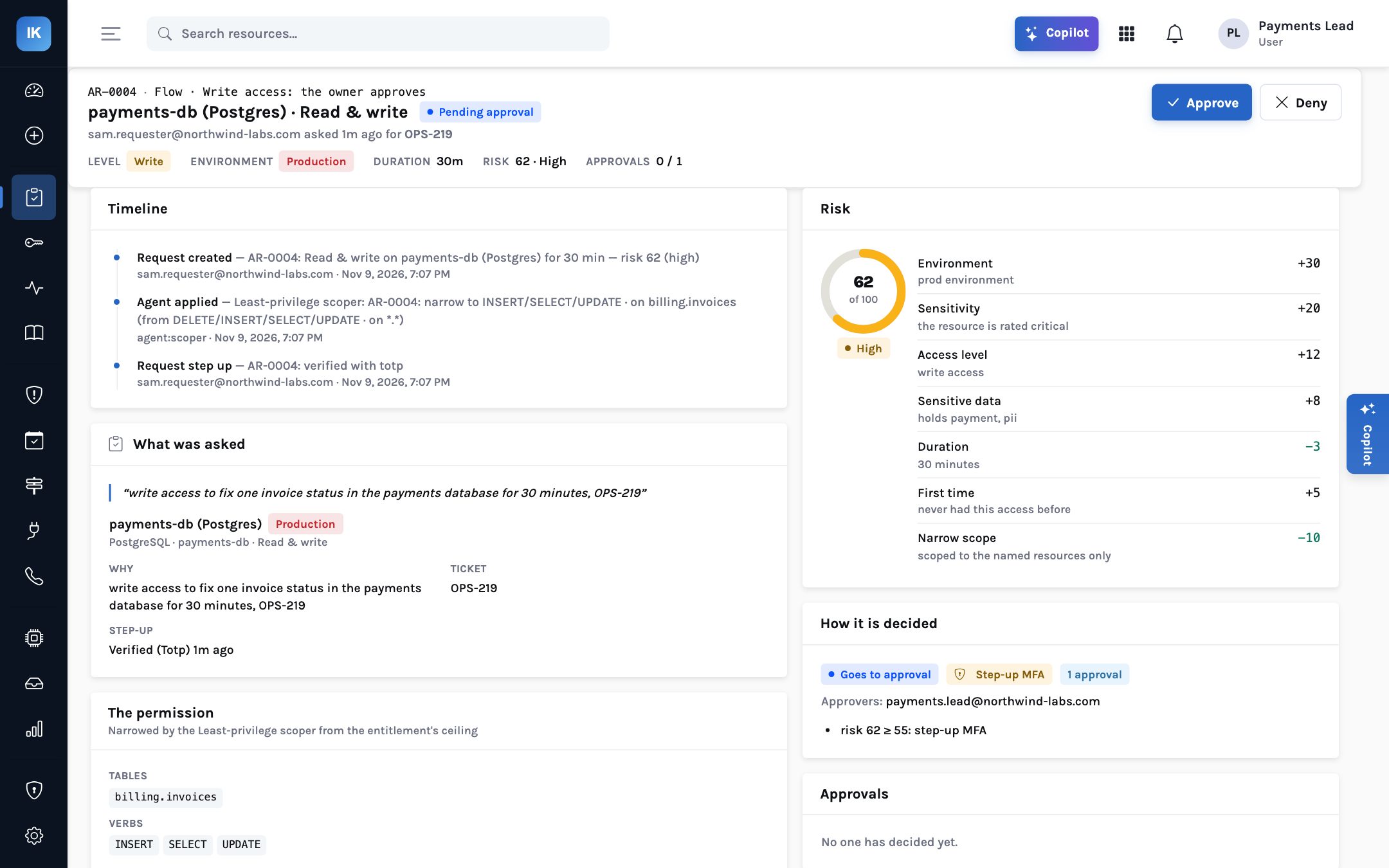
Now AR-0004. Sam asked for write access to fix one invoice status, 30 minutes, ticket OPS-219.
Production +30, critical +20, write +12, sensitive data +8, 30 minutes −3, first time +5,
narrow scope −10. Total 62, High. Flow #20 sends write access to the resource owner; the score
of 62 adds a step-up before the owner sees it. Sam confirmed with an authenticator app, and the
request arrived with payments.lead showing exactly what was being asked: INSERT, SELECT and UPDATE
on billing.invoices, for 30 minutes, for OPS-219.
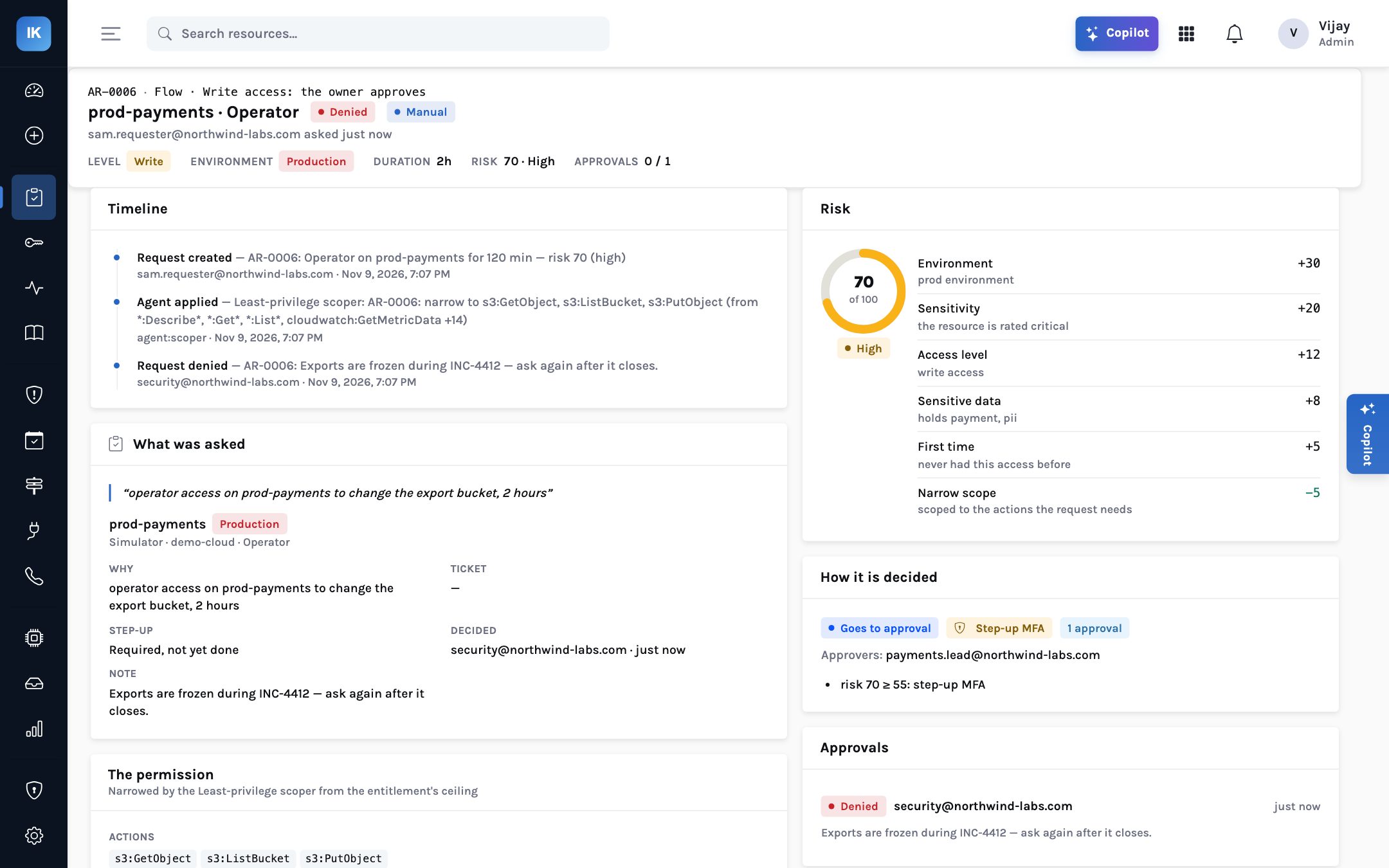
AR-0006 shows the other half of human approval. Sam asked for operator access on prod-payments to change the export bucket, for two hours, during an incident. Score 70. Security denied it with a note: “Exports are frozen during INC-4412 — ask again after it closes.” No score could have known that. That is what people are for, and why routing the safe requests away from them matters: it leaves time for this.
Step-up: proving it is still you
Sign-in MFA comes from the organisation’s identity provider. Step-up is different: a second factor asked for at the moment of a risky request, so that a hijacked browser session cannot request production admin on its own. InsightKeys supports an authenticator app (TOTP, the time-based one-time password standard, with replay protection) or a Duo push. A step-up lasts five minutes and works once. It is triggered by a score of 55 or more, by flows that ask for it, by break-glass, and for approvers on flows that require approver MFA.
Limits worth knowing
Push-based second factors can be worn down by repeated prompts; prefer the authenticator app for step-up where that is a concern. Passkey (WebAuthn) step-up is on the roadmap, not available today. On-call status and incidents feed the score from schedules kept in InsightKeys; PagerDuty and Opsgenie sync and Jira or ServiceNow ticket validation are planned, so a ticket number is recorded but not yet checked against the ticketing system. Thresholds and weights are a starting point: review them against your own approvals for the first month.
Tuning without gaming
Any score will be gamed if the incentives are wrong. Three safeguards are built into the design. The factors that lower the score are checkable: on-call status comes from schedules, incidents from the incident record, narrow scope from the permission actually granted. A recent denial of a similar request adds points, so asking again in different words does not reset the clock. And the Risk & approval agent works under the autonomy dial: at its default, L3, it acts and tells, and every automatic approval sits in the agent inbox and the audit trail where it can be reviewed and pulled back.
Who may ask for what, the longest grant, ticket rules, step-up and break-glass. The score only routes inside these rules.
Lower the automatic threshold below 30 for the first weeks if you prefer, and widen it once you trust the records.
Try common requests at different times and durations and check the routes match what a careful manager would do.
Read the agent inbox and audit trail. Look for automatic approvals you would not have given.
If a pattern is consistently mis-routed, change the weight or the flow. Avoid one-off exceptions for individuals.
An approval that is always given is not a control. An approval with the reasons on screen is.
Approve the safe requests on the spot, ask for a second factor when it matters, and send the rest to someone who can see exactly what is being asked and why.